Works with the AI Agents you already use
 Claude Code
 Cursor
 Codex CLI
 Muse
 Dots+21 moreClaude CodeCursorCodex CLIMuseDots
 Manus
 Grok
 Grok Bot+18 agents
ssych trading UI
Builds trading, crypto and fintech screens in React from the ssych component library: picks the parts, checks them against the live registry, installs them with the shadcn CLI and lays out a dense dark screen.
Free

ssych trading UI
Example session with this skill installed
Build me a BTC screen in this Vite + React app: a candlestick price chart with volume, and the order book next to it. Dark and dense.
- Read your context and instructions
- Compiled the ssych trading ui
- Generated the app files
Summary
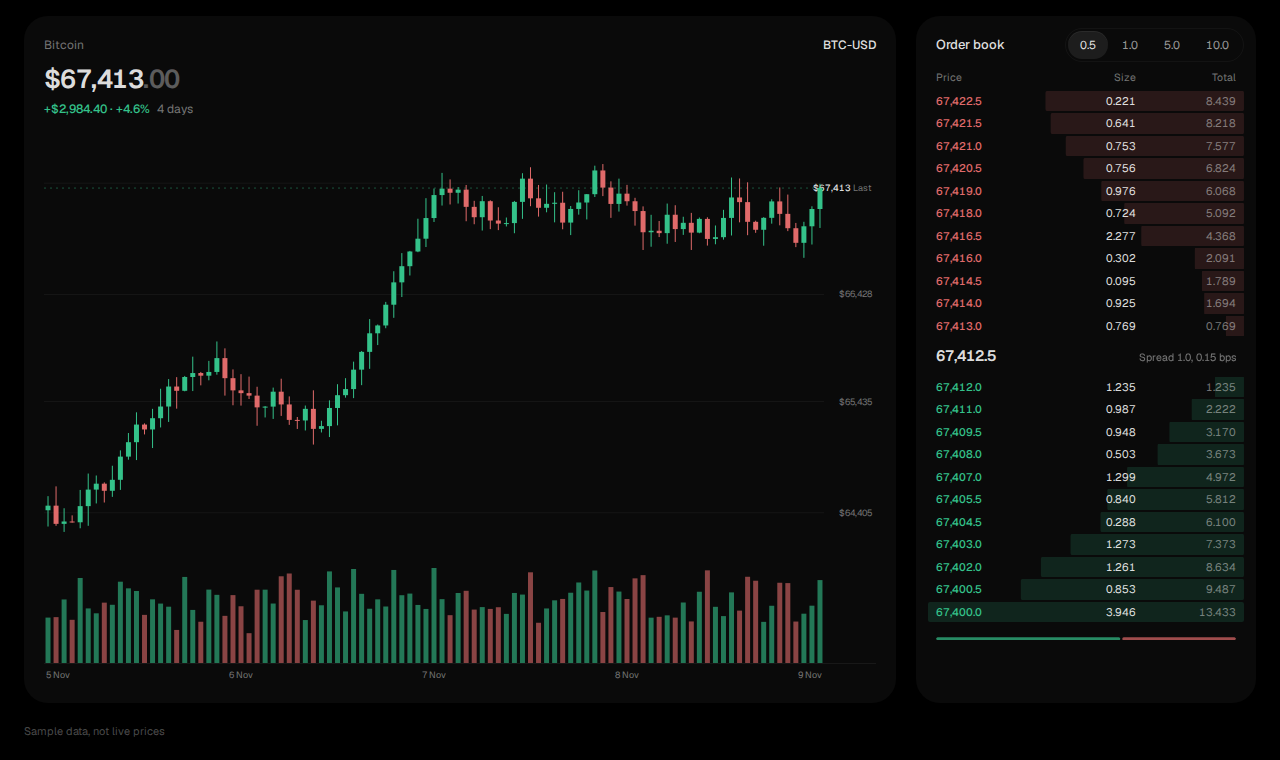
Built a BTC-USD screen from 2 free ssych parts: a candlestick chart with volume and an order book. It shows sample data until a market feed is wired in, and says so on screen.
Parts checked against the live registry
free  candlestick  Candlestick Chart  (npm: clsx motion tailwind-merge)
free  order-book   Order Book         (npm: clsx motion tailwind-merge; pulls in: segmented-control)
Installed
npx shadcn@latest add @ssych/candlestick @ssych/order-book --yes
The source is in components/ui: candlestick.tsx, order-book.tsx, the segmented-control the order book uses for price grouping, the shared chart helpers and the colour tokens (--chart-up, --chart-down).
Layout
| Column | Part | What it shows |
|---|---|---|
| Left, wide | Candlestick | price, change over the range, OHLC candles, volume pane, value axis on the right |
| Right, 300px | OrderBook | asks and bids with depth bars, the spread, grouping 0.5 / 1.0 / 5.0 / 10.0 |
Black ground, one faint fill per block, green and red only for up and down, tabular figures, a "Sample data, not live prices" line under the grid.
Next steps
- Pass your exchange's data through the props each file defines (
candleson the chart,bidsandaskson the book). - Set
feed={false}onOrderBookonce real data is in, so the demo motion stops. - Add
depth-chartbehind a Price / Depth switch,order-ticketandpositions-tablefor a full terminal.
candlestick.tsx
ZIP · project files
Example file from a real run - the skill writes it into your workspace.
Connects securely to your tools. The creator never sees your data.
About this skill
Build trading, crypto and fintech screens in React with the ssych component library.
Ask your agent for a trading terminal, an order book, a depth or candlestick chart, a swap ticket, a positions table, a portfolio or wallet dashboard, a screener or a KPI row. The skill:
- Picks the parts. It maps your request to a screen in its recipe list (terminal, swap, portfolio, wallet, screener, stock research, journal, KPI rows, payments, AI console) and to the parts that build it.
- Checks every slug against the live registry at ui.ssych.com, so it never installs a part that does not exist. Each one comes back free, paid or missing.
- Installs with the shadcn CLI (
npx shadcn@latest add @ssych/<slug>). The source lands in your repo undercomponents/ui, TypeScript and Tailwind, charts in plain SVG. - Lays the screen out by a short set of rules: black ground, fills instead of borders, colour only for up and down, tabular figures, wide low charts.
- Builds the app and tells you which parts it used and whether the screen shows real or sample data.
Free and paid
The 116 single components are free under MIT and need no account. 17 full dashboard screens are paid on ssych.com. The skill says which is which and builds from free parts unless you own a paid screen.
What it does not do
- No market data feed. The parts render the data you pass them and show sample data until you do.
- No chart library. Every chart is SVG inside the component.
Components and previews: https://ssych.com/library · Source: https://github.com/savvasicevs/ssych-skills
No market data feed: the parts show sample data until you pass your own through their props. Paid dashboard screens install only from an ssych.com account that owns them, so without one the skill builds from free parts. Charts cover what the parts include (candles, volume, depth, lines); no indicator library.
How to use
- 1
Connect your agent to the Agensi MCP
Copy the prompt and paste it into Claude, ChatGPT, Cursor or any agent that supports MCP. It sets up the connection for you. Manual setup
- 2
Sign in to Agensi
Your agent shows a sign-in link. Sign in and click Allow.
- 3
Ask for what you need
Your agent loads this skill and uses it on your task. It always asks before any payment.
Reviews
No reviews yet
Be one of the first to try it. Every listed skill goes through the trust checks below.
Security scanned
Checked by our 8-point scan before listing
Fresh listing
Recently published to Agensi
Free forever
No account required to browse
Trust & safety
Security scan
Security scan passed 7 days ago
- Free with an Agensi account
Requires
 Node.js
Permissions
Runs the shadcn CLI and a small Node script in the terminal, reads the ssych registry over the network (ui.ssych.com), and writes the installed parts and the screen into your project.