MCP Setup Guide
Connect your AI assistant to Agensi in about two minutes. No coding. If you can paste a link, you can do this.
Easiest way to connect
Copy this prompt and give it to your AI Agent. It connects itself to Agensi and can then find, buy and install skills for you.
Add Agensi to your AI assistant
Agensi is in Claude's official connector directory
No config file, no URL pasting. Install it straight from Claude:
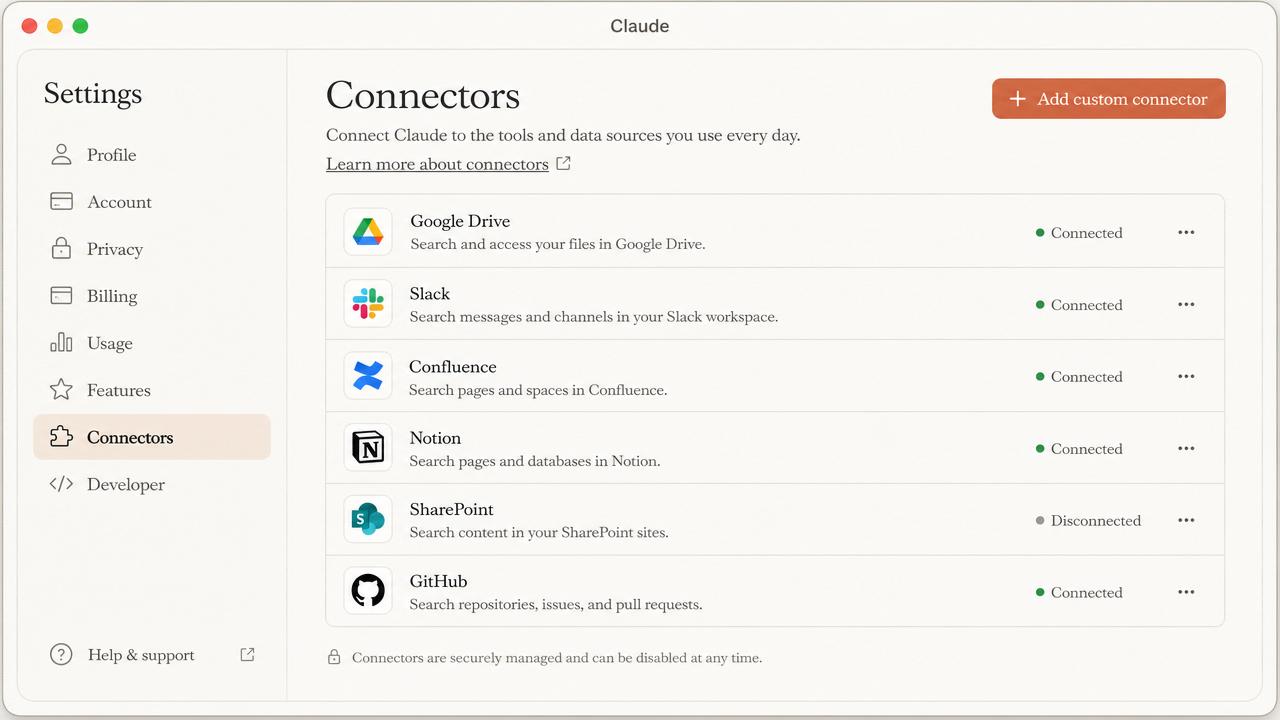
- In Claude, open Settings then Connectors.
- Click Browse connectors and search for Agensi.
- Click Connect, then approve the sign-in window. Done.
Works in Claude web, desktop, and mobile on Free, Pro, Max, Team, and Enterprise plans.
Don't see it in the directory? Add it as a custom connector
- 1
Copy your MCP connection link.
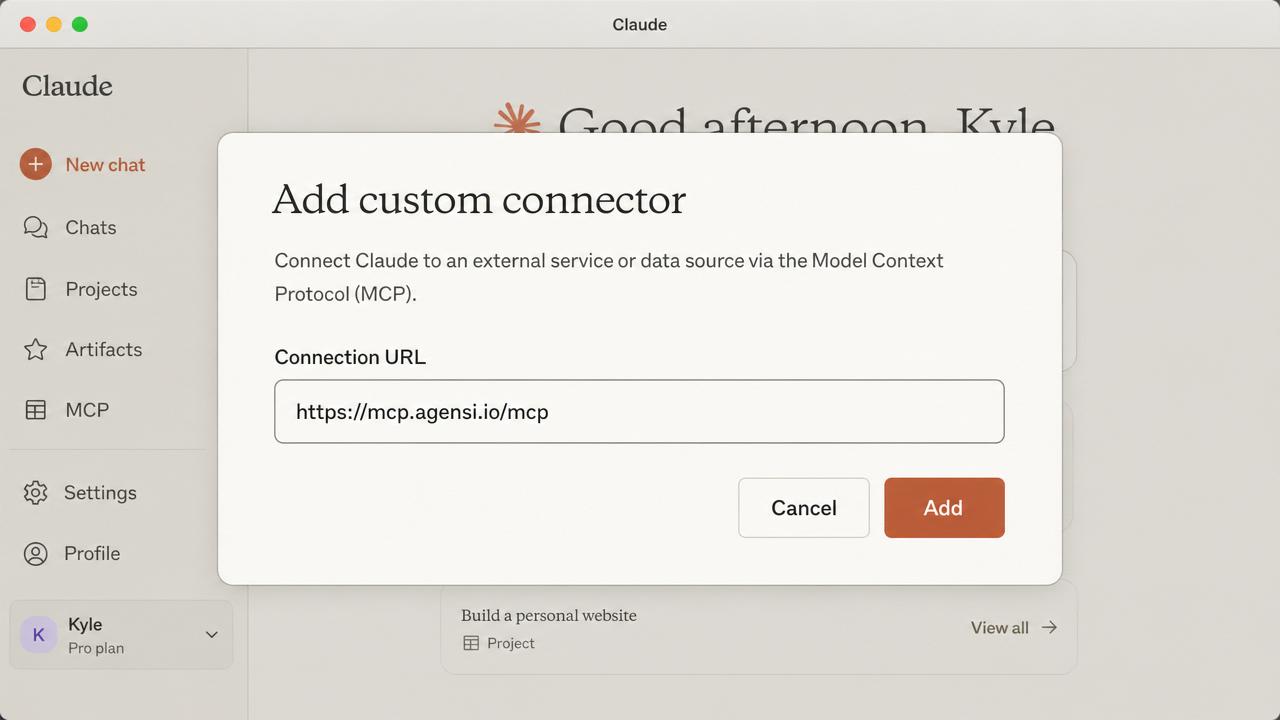
https://mcp.agensi.io/mcp
Same URL for every Agensi user. No account or API key needed yet.
- 2
In Claude, open Settings, then Connectors, then Add custom connector.
- 3
Paste the link and click Add. Done.
When you first install or buy a skill, your AI shows a Sign in with Agensi window. Approve it and your account is created and linked automatically. No API key needed.
Verify it works
Ask your AI:
If it comes back with Agensi results, you are connected.
Every other agent
The same connection works everywhere. Here is the exact line to add, plus the skills folder each agent reads from.
Claude
Sign in with AgensiOpen Settings, then Connectors, then Browse connectors and add Agensi (or Add custom connector and paste https://mcp.agensi.io/mcp).
~/.claude/skills
ChatGPT
Sign in with AgensiOpen Settings, then Connectors, then Add and choose Custom MCP server, and paste https://mcp.agensi.io/mcp.
~/.chatgpt/skills
Claude Code
Sign in with AgensiRun: claude mcp add agensi --transport http --url https://mcp.agensi.io/mcp
~/.claude/skills
Cursor
Sign in with AgensiAdd an HTTP MCP server named "agensi" with url https://mcp.agensi.io/mcp to .cursor/mcp.json.
~/.cursor/skills
Codex CLI
Sign in with AgensiAdd to ~/.codex/config.toml: [[mcp]] name = "agensi", type = "url", url = "https://mcp.agensi.io/mcp"
~/.codex/skills
VS Code
Sign in with AgensiRun "MCP: Add Server" from the command palette, choose HTTP, and use https://mcp.agensi.io/mcp.
.vscode/skills
Gemini CLI
Sign in with AgensiAdd an "agensi" http MCP server with url https://mcp.agensi.io/mcp to ~/.gemini/settings.json.
~/.gemini/skills
GitHub Copilot
Sign in with AgensiAdd an "agensi" http MCP server with url https://mcp.agensi.io/mcp to .vscode/mcp.json in this repository.
.github/copilot/skills
Windsurf
Sign in with AgensiAdd a "serverUrl" MCP entry named "agensi" pointing at https://mcp.agensi.io/mcp in ~/.codeium/windsurf/mcp_config.json.
~/.windsurf/skills
Cline
Sign in with AgensiOpen the MCP Servers panel, choose Remote server, and add https://mcp.agensi.io/mcp.
.cline/skills
Zed
Sign in with AgensiAdd a context server named "agensi" with url https://mcp.agensi.io/mcp in your Zed settings.
~/.config/zed/skills
Kiro
Sign in with AgensiAdd an "agensi" http MCP server with url https://mcp.agensi.io/mcp to ~/.kiro/settings/mcp.json.
~/.kiro/skills
OpenClaw
API keyAdd an "agensi" http MCP server with url https://mcp.agensi.io/mcp to your OpenClaw config.
~/.openclaw/skills
Grok
API keyAdd an "agensi" http MCP server with url https://mcp.agensi.io/mcp to your Grok MCP config.
~/.grok/skills
Aider
API keyAdd an "agensi" http MCP server with url https://mcp.agensi.io/mcp to .aider.conf.yml.
.aider/skills
What your agent can do
Agensi exposes 20 tools, from searching the catalogue to running a skill, installing updates and publishing your own listings.