Works with the AI Agents you already use
 Claude Code
 Cursor
 Codex CLI
 Muse
 Dots+21 moreClaude CodeCursorCodex CLIMuseDots
 Manus
 Grok
 Grok Bot+18 agents
Session Handoff Lite
One session ends as the next one starts working immediately
Free

Session Handoff Lite
Example session with this skill installed
I'm hitting the context limit. Wrap this session up into a handoff. We were halfway through migrating the auth logic to the new provider.
- Read your context and instructions
- Compiled the session handoff lite
I have generated the HANDOFF.md file at the repository root to capture the current progress of the authentication provider migration.
HANDOFF.md
1. Objective and state
Goal: Migrate authentication logic from LegacyAuth to NewProvider.
Status: In progress. The core provider interface is implemented in src/auth/new_provider.ts, but call sites in the middleware are still using the legacy implementation.
2. Decisions and why
Chose manual migration over automated codemods because the legacy signatures vary significantly between the API and the internal dashboard.
Chose to keep both providers active during the transition to allow for a phased rollout and easier rollbacks.
3. The "do not redo" list
Do not attempt to use provider-utils.v2.js for this migration. I tried integrating it for 30 minutes, but it has a hard dependency on Node 14 globals that break our current CI pipeline.
Do not refactor the User interface yet; changing the ID type now causes a cascade of failures in the reporting service.
4. Next actions with acceptance criteria
- Migrate
middleware/auth.ts: Update theverifySessionfunction to useNewProvider.validate().- Acceptance:
npm run test:unit middlewarepasses.
- Acceptance:
- Update
routes/login.ts: ReplaceLegacyAuth.login()withNewProvider.authenticate().- Acceptance: Manual login via
/api/loginreturns a JWT with the new header format.
- Acceptance: Manual login via
5. Verification recipe
Run the following to verify the current broken state:
npm run test:auth
Expected result: 12 tests passing, 4 failing (specifically the middleware integration tests). If more than 4 fail, check if the .env.local provider keys have expired.
Next steps
- Commit the
HANDOFF.mdfile to the branch. - Start the next session by feeding this file to the agent.
- Begin with the middleware migration as outlined in the next actions.
Connects securely to your tools. The creator never sees your data.
About this skill
The problem. Context fills up mid-refactor, or you stop mid-debug, and the next session spends its first couple of turns re-reading code to reconstruct state, re-trying an approach that already failed, or "fixing" something that was chosen the other way on purpose. What gets lost is never the obvious stuff, it's the decisions and the dead ends.
What it does. When a session is ending, this skill writes a single HANDOFF.md with five sections: objective and state, decisions and why, the do-not-redo list, next actions with acceptance criteria, and a verification recipe. The bar it holds itself to: a fresh session reads it and starts working without asking a single question.
Why this beats prompting it yourself. Ask an agent to "summarize where we are" and you get a narrative with the uncertainty baked in. The failure modes are specific: dead ends vanish, decisions lose their rationale, state becomes vague. This skill inverts the priorities, failed attempts are treated as the most valuable content, decisions carry their reasons, and state is pinned to SHAs, paths and commands.
What's inside
SKILL.md— the five-section method, the writing rules, and a worked example.
limitations
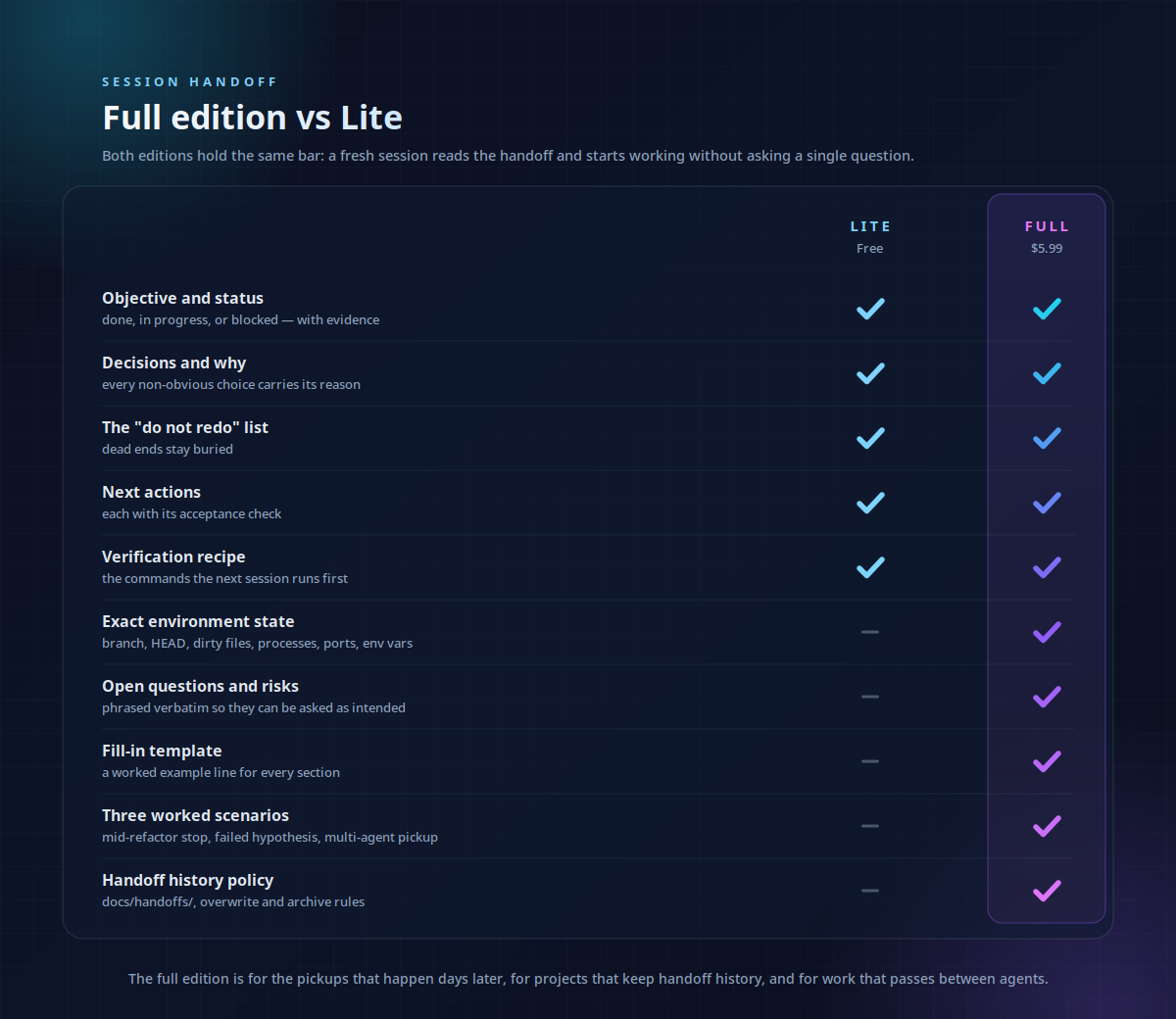
- Lite edition: covers a single session's wrap-up. Environment capture, open-questions handling, a fill-in template, and worked multi-agent scenarios are in the full Session Handoff skill.
- It writes the document; it doesn't archive your previous handoffs for you.
- It cannot recover context that was already lost before it ran, run it before compaction, not after.
FAQ
Is this really free? Yes. It is a deliberate cut of the full Session Handoff skill: same method, one session, one file, no template or scripts.
What's the difference from the full Session Handoff skill? The full edition adds environment capture (processes, ports, env vars), open-questions handling, a fill-in template, worked scenarios including multi-agent pickup, and a handoff history policy.
Does this work in Cursor, Codex or Copilot? Yes — plain instructions with no runtime; it works anywhere the skill format is supported.
Where does the handoff file go? HANDOFF.md at the repository root, committed with the work it describes.
What if the session achieved nothing? Then the handoff is short: objective, blocked status, and the do-not-redo list — the valuable output of a session that failed.
Requires local file system access to write the HANDOFF.md file. Does not include environment variable capture or complex multi-agent orchestration.
How to use
- 1
Connect your agent to the Agensi MCP
Copy the prompt and paste it into Claude, ChatGPT, Cursor or any agent that supports MCP. It sets up the connection for you. Manual setup
- 2
Sign in to Agensi
Your agent shows a sign-in link. Sign in and click Allow.
- 3
Ask for what you need
Your agent loads this skill and uses it on your task. It always asks before any payment.
Reviews
No reviews yet
Be one of the first to try it. Every listed skill goes through the trust checks below.
Security scanned
Checked by our 8-point scan before listing
1 use
Times used to date
Free forever
No account required to browse
Trust & safety
Security scan
Security scan passed 1 month ago
- Free with an Agensi account