More screenshots
Works with the AI Agents you already use
 Claude Code
 Cursor
 Codex CLI
 Muse
 Dots+21 moreClaude CodeCursorCodex CLIMuseDots
 Manus
 Grok
 Grok Bot+18 agents
SEO Readout: GA4, Search Console & Google Ads Explainer
Drop in your GA4, Search Console and Google Ads exports. Get one clean dataset, a data health check, and a plain-language answer to "why did traffic change?", plus a client-ready report where every number is checked.
$29.99

SEO Readout: GA4, Search Console & Google Ads Explainer
Example session with this skill installed
I've attached Northwind Bakery's Search Console 16-month export, a GA4 daily channel export and a Google Ads campaign report. Clicks from Google fell hard last month. Why did search traffic drop? Brand term is "northwind". We launched a new blog template on October 5.
- Read your context and instructions
- Compiled the seo readout
- Generated the document
Short answer
Clicks from Google search fell
38.5% because three sourdough blog posts dropped from about position 4 to about position 7. The drop started on
October 6, the day after the new blog template launched.
1. Is it real?
Yes. The drop shows up in both Search Console and GA4, and the ratio between the two barely moved (0.859 to 0.826), so this is a real change in visits, not a tracking problem.
Side note: GA4 recorded only 20 sessions on October 12, against a usual level of about 854. Every channel dropped that day, which points to a tracking gap. It doesn't affect the Search Console numbers, but GA4 totals for this period are slightly understated.
2. Is it unusual?
Yes. A normal 28-day swing for this site is between -5.6% and 5.8%. This period fell 38.5%. Last year the same weeks moved -6.7%, so seasonality explains very little of it.
3. Where?
| What | Share of the change |
|---|---|
| Three sourdough posts | 91.8% of all click losses |
| Sourdough starter guide alone | 58.9% of net change (6,388 → 2,543 clicks) |
Top losing searches: "sourdough starter guide", "how to make sourdough starter".
4. What kind?
A
ranking loss. Average position slipped from 5.7 to 7.3 site-wide, and from 4.0 to 7.1 on the starter guide. Click-through rate fell from 9.47% to 6.66%. It isn't a brand problem: branded clicks moved -7.6% while non-branded clicks fell 49.2%.
5. When?
The trend shifted on
October 6. Daily clicks averaged 630.9 before and 292.8 after. That date coincides with the blog redesign on October 5 and falls inside Google's September 2026 spam update (September 24 to October 8). Timing alone doesn't prove either one caused it.
6. Check next
High: Check the new blog template for changes to titles, headings, internal links, canonical tags and noindex settings.
2. Medium: Compare the three posts with the pages that now rank above them.
Files: client report (report.html), trend chart, channel chart, brand split chart. Want the client-ready report?
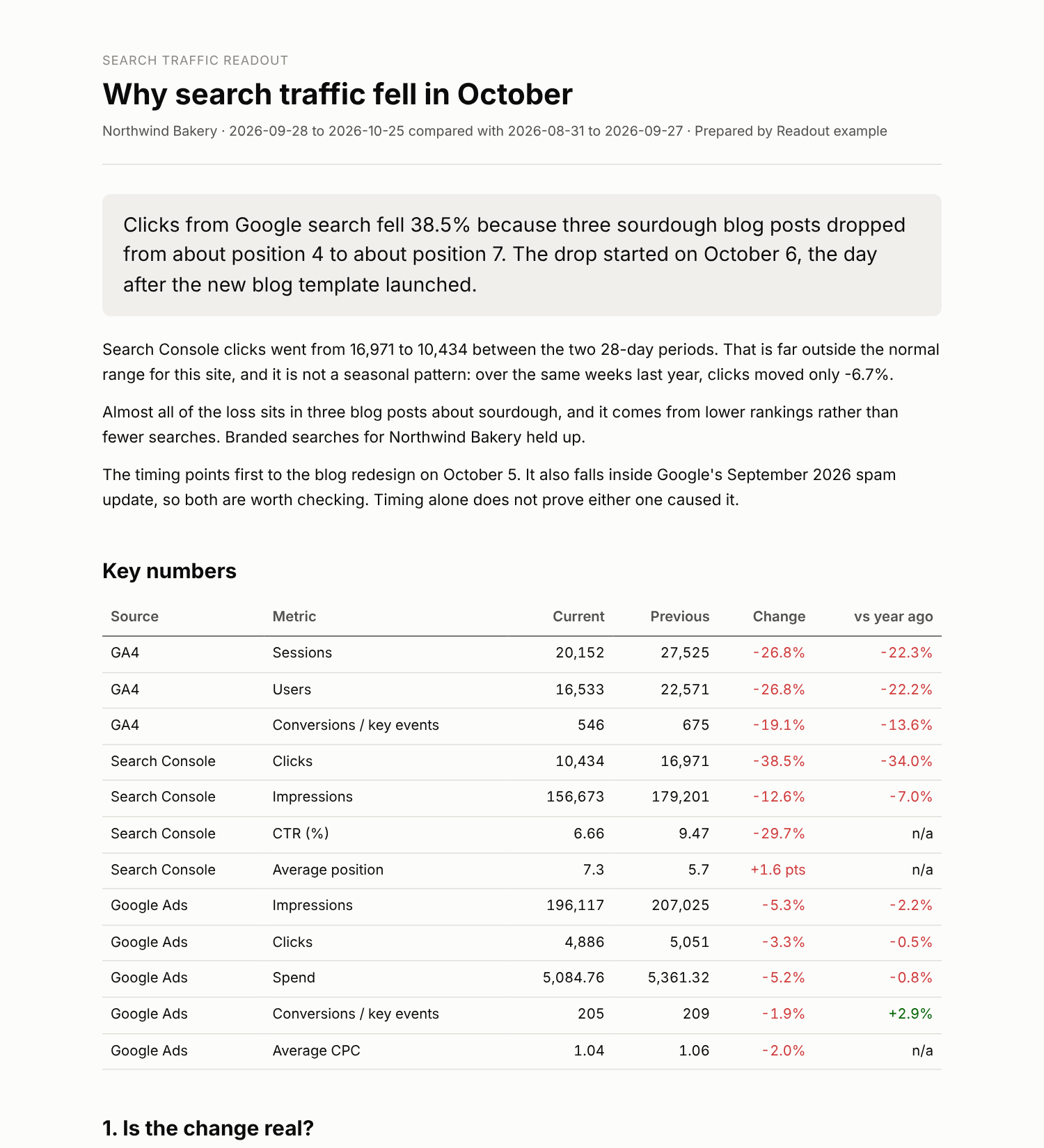
report.html
PDF · document
Example file from a real run - the skill writes it into your workspace.
Connects securely to your tools. The creator never sees your data.
About this skill
Stop spending an afternoon on every "why did traffic drop?" email
SEO Readout turns the exports you already download from GA4, Google Search Console and Google Ads into answers a client can read. It's built for solo SEO, GEO and marketing consultants who report to several clients.
One rule runs everything: scripts calculate, the AI explains. Every number in a Readout summary or report comes from Python, not from the language model. The report builder refuses to publish a narrative that contains a number it can't trace back to the calculated results. No made-up stats in front of your client.
What it does
1. Combines your data into one clean view
- Merges GA4, Search Console and Google Ads exports into one standard daily table
- Checks data health first: missing dates, near-zero tracking days, mismatched date ranges
- Summarizes channels and compares this period with the previous one and with last year
- Shows numbers that never match (Search Console clicks vs GA4 sessions, Ads clicks vs GA4 paid sessions) side by side, and explains why they differ
- Delivers an Excel workbook, a clean CSV and charts
2. Explains why traffic changed, in six questions
- Is it real? Or is it a tracking problem?
- Is it unusual? Compared with this site's normal swings and the same weeks last year
- Where? Which pages, queries and channels drive the change, and their share of it
- What kind? Ranking loss, demand shift, results-page change or brand
- When? The date the trend shifted, matched to your own event log and a dated list of Google updates
- What should you check next? Ranked by confidence
It then writes a client-ready HTML report that prints cleanly to PDF.
Why consultants trust it
- Works with exports exactly as downloaded. Search Console zips, GA4 CSVs with their comment lines, Google Ads reports with title rows and totals. No reformatting, no API keys.
- Never adds numbers from different tools together. Gaps between tools are explained, not hidden.
- "Coincides with", never "caused by". Timing is reported as timing.
- Seasonality is tested, not assumed.
- Honest about limits. Thresholds are listed so they can be questioned, and the skill warns when the Google update list is older than the change.
What you need
Exports from any of GA4, Search Console and Google Ads. Search Console alone still gives a useful readout. A step-by-step export guide is included.
Requires Python 3.10+, pandas, numpy, matplotlib, and openpyxl. Supports only native exports from GA4, GSC, and Google Ads. Does not connect to live APIs.
How to use
- 1
Connect your agent to the Agensi MCP
Copy the prompt and paste it into Claude, ChatGPT, Cursor or any agent that supports MCP. It sets up the connection for you. Manual setup
- 2
Sign in to Agensi
Your agent shows a sign-in link. Sign in and click Allow.
- 3
Ask for what you need
Your agent loads this skill and uses it on your task. It always asks before any payment.
Reviews
No reviews yet
Be one of the first to try it. Every listed skill goes through the trust checks below.
Security scanned
Checked by our 8-point scan before listing
Fresh listing
Recently published to Agensi
Money-back guarantee
Doesn't do what its page promises? You get your money back.
Trust & safety
Security scan
Security scan passed today
Requires
 Python
Permissions
File Scopes
Shell runs the Python scripts that do every calculation. Read Files opens your exports. Write Files saves the workbook, charts and report. No data leaves your machine.