More screenshots
Works with the AI Agents you already use
 Claude Code
 Cursor
 Codex CLI
 Muse
 Dots+21 moreClaude CodeCursorCodex CLIMuseDots
 Manus
 Grok
 Grok Bot+18 agents
Meme Studio
Create expressive memes, photo reactions, transparent stickers and coordinated character packs with editable captions. Complete free creative workflow.
Free

Meme Studio
Example session with this skill installed
Use Meme Studio to create a complete eight-reaction set for an original little green frog named Sprout. Give it a tactile hand-printed ink-comic feel, a pale yellow belly, rounded limbs and a consistent silhouette. Keep it friendly, slightly dry and suitable for everyday chats.
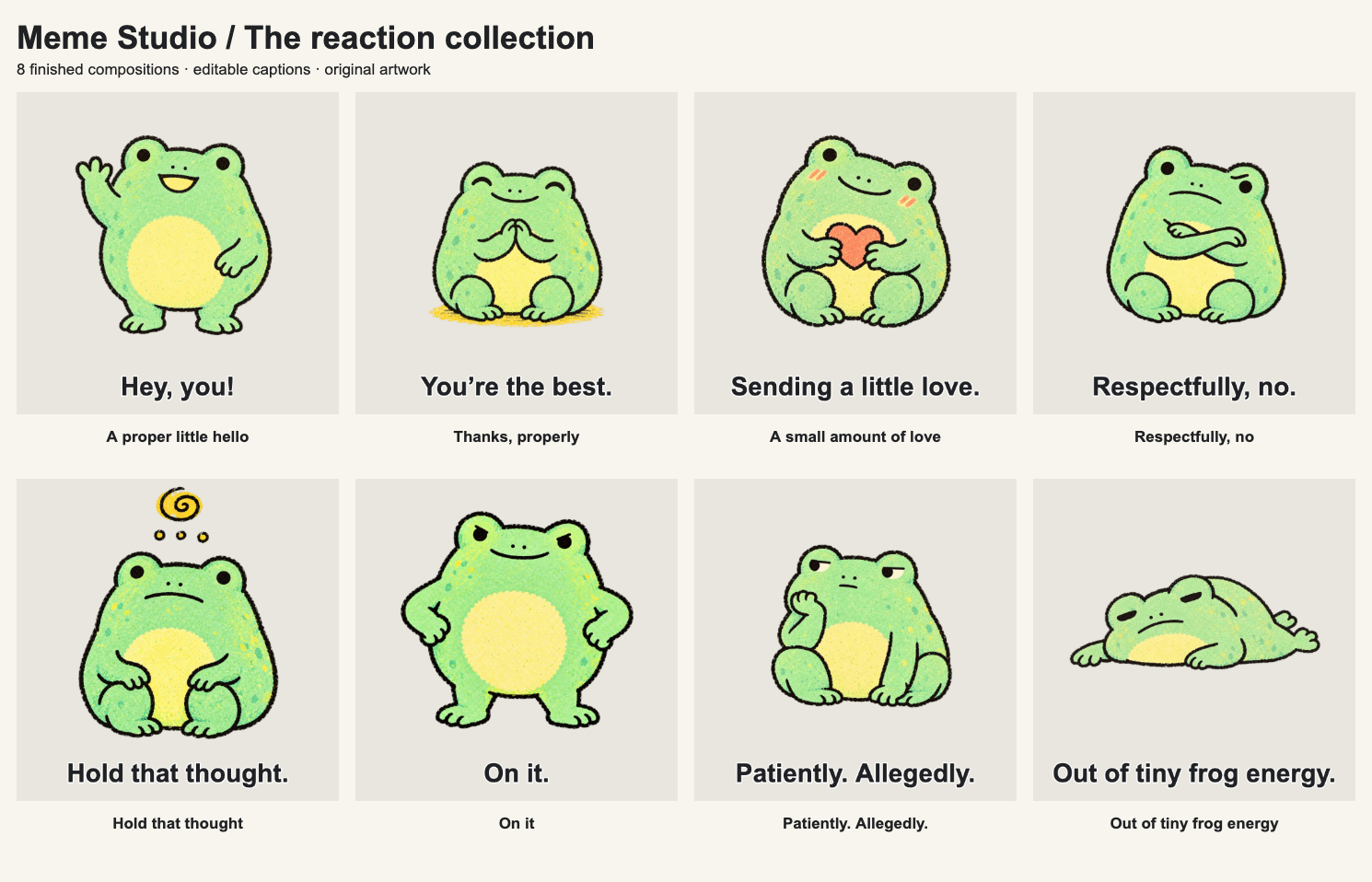
Make genuinely different gestures for hello, thanks, love, a gentle no, processing, on it, waiting and tired. Use these exact captions: "Hey, you!", "You're the best.", "Sending a little love.", "Respectfully, no.", "Hold that thought.", "On it.", "Patiently. Allegedly.", and "Out of tiny frog energy."
Deliver eight independent 1024 × 1024 PNGs with genuine transparent backgrounds, a contact sheet and caption metadata. Keep the text native and editable; inspect the result on light and dark surfaces. If the environment supports execution and artifact retrieval, save an editable composition project as well. Use original fictional artwork, with no real person's photo.
- Read your context and instructions
- Compiled the meme studio
- Generated the image
Complete creator-local worked result
I made Sprout as an original green ink-comic frog with a pale yellow belly, dark hand-drawn outlines and a consistent rounded silhouette. The finished set contains eight independently useful replies with different gestures. This is a fictional creator demonstration.
Eight actual image exports
| File | Caption | Visible expression / gesture |
|---|---|---|
| sprout-hello.png | Hey, you! | Standing, smiling and waving |
| sprout-thanks.png | You’re the best. | Seated, eyes closed, hands together in thanks |
| sprout-love.png | Sending a little love. | Holding a small coral heart |
| sticker-respectfully-no.png | Respectfully, no. | Seated with crossed arms and a clear boundary |
| sprout-hold-thought.png | Hold that thought. | Thoughtful pause with a small spiral thought cue |
| sprout-on-it.png | On it. | Confident stance with hands at the hips |
| sprout-waiting.png | Patiently. Allegedly. | Cheek resting on one hand while waiting |
| sprout-tired.png | Out of tiny frog energy. | Lying down with head on folded arms |
All eight files were exported through the real browser workspace as 1024x1024 RGBA PNGs. Each file has both transparent and opaque pixels; the preview panels' pale or dark backgrounds are not baked into those sticker files.
Actual accompanying outputs
- A selected-set ZIP containing only the eight individual PNGs, a 1490 × 958 contact-sheet PNG and caption metadata.
- A saved composition project with editable captions, names and layout settings. Painted character art remains raster.
- A full creator demonstration export containing 72 actual composition PNGs; this broader gallery is separate from the requested eight-image set.
What I checked
The eight gestures, silhouettes, yellow belly and ink treatment were compared. Words were checked against the intended reply and visible expression. Individual alpha exports and light/dark caption contrast were inspected. The selected-set ZIP was opened and its members and PNG dimensions were verified. Saved HTML and project JSON reopening were exercised, including an edited caption and locally imported artwork. The creator-local technical suite passed 44 core checks.
Using the set
Choose the individual reply you need and send its PNG in a destination that accepts image attachments. The contact sheet helps you choose; it is not a replacement for the individual images. Where the environment supports the optional helper, reopen the composition to change the caption or layout, then export again. New poses require your Agent's image generation/editing tool.
These are general image files. Platform-native sticker installation and animation have not been verified. Agensi buyer-side supporting-file execution, permission to deliver the generated composition runtime and generated-output retrieval remain unverified; this local example is not an Agensi buyer execution result. No downloadable Skill source is promised.
sprout-hello.png
PNG · 1536×1024
Example file from a real run - the skill writes it into your workspace.
Connects securely to your tools. The creator never sees your data.
About this skill
Small images. Big feelings.
Make the image you actually want to send: a dry work reply, a pet with opinions, a tiny celebration, a gentle no, an absurd object or an original character your friends recognise. Meme Studio is a complete free creative Skill for finished memes, reaction images, transparent stickers and short image comics.
Start with a situation, a photo or a few words. The Skill chooses a useful visual idea, directs the expression, writes natural English and finishes the composition with readable, editable captions. One requested reaction stays a simple task; a coordinated pack gets a proper expression plan.
Many situations. Distinct visual personalities.
The six gallery boards show 72 actual finished creator compositions across all 24 situation families: work, freelance clients, customer support, creators, study, tech and online life, gaming, online communities, friends, affection, dating boundaries, pets, hobbies, food, fitness, shopping, life admin, home, everyday chaos, moods, small wins, plans and travel, seasons and occasions, and cosy weather.
Twelve original subject families demonstrate photography, needle felt, ink comic, retro metal, clay, gouache, cut paper, pixel illustration, woodcut, watercolour, rubber-hose animation-inspired drawing and surreal miniature art. People are optional: pets, plants, food, machines and expressive objects can carry the joke just as well.
The guidance includes 144 situation recipes and 24 art-direction recipes. These guide new creations and are counted separately from finished examples. Choose a fitting direction or originate a new one for the actual brief.
A pack should have different reactions
The creator demonstration includes 13 curated collections. Eight character collections contain genuinely different expressive states. Sprout has eight coordinated transparent replies; Orbit and Bram each have three distinct poses. Four other material collections deliberately show three caption editions of one artwork. Rewriting a caption does not count as inventing another expression.
For your own pack, establish an approved character anchor, keep its silhouette and material recognisable, then change gestures and expressions to match useful conversation replies. Deliver separate images and a contact sheet so each member of the set is usable.
Bring a photo. Keep the words editable.
Use an approved pet, person or object photo directly with a caption, or transform it with your Agent's image-editing tool. The source workflow records recognisable cues and checks the result beside the reference. The gallery's cat source and human illustrations are fictional original demonstrations; real-customer likeness acceptance is not yet verified. Artistic transformation can change identity details and requires your review.
Native text stays separate from raster artwork. Choose caption bands, classic outlined lettering, a reaction card, transparent sticker, split panels, a short comic or a typographic card. The optional local workspace supports square, 4:5, 16:9 and 9:16 compositions, image import, text-card creation, caption and label edits, colour/type/framing controls, individual PNGs, complete or selected-set ZIPs, contact sheets and saved/reopened HTML/JSON projects. Painted artwork remains flattened.
The workspace composes existing artwork; it does not generate images or remove backgrounds. New artwork and background extraction use the image tools available in your Agent. Free Skill access does not include your Agent subscription, model credits or image-provider charges. No particular paid provider, seller backend or npm installation is required by the optional Node.js 20+ helper.
Evidence and delivery
44 creator-local core checks passed. All 72 compositions were rendered and downloaded as actual PNGs through the browser. The complete eight-image Sprout export has real alpha in every individual file. Photo import, invalid-file refusal, JPEG orientation, native text creation, caption editing, selected-set export, saved-project reopening, clean package extraction and a bounded 430px mobile layout check were exercised. These are local technical checks, not external user testing or a promise of universal humour.
Agensi delivers the Skill instructions through its agent connection. This listing does not promise downloaded Skill source or offline Skill access. Requested PNGs, contact sheets and editable compositions are intended generated user work. Agensi buyer-side supporting-file execution, permission to include the composition runtime in generated work, and generated-work retrieval remain unverified. Platform compatibility review is requested before approval; loading SKILL.md alone does not prove the optional multi-file workflow works.
Static images are the supported release. Animated stickers, automatic posting and platform-native sticker installation are not verified features. Use sources you are allowed to provide; output rights depend on the source and image tool's terms. The Skill does not upload your private photos or publish reactions automatically.
Static images only. No platform-native sticker installation, animation, automatic posting, universal humour or virality guarantee. Photo transformations can change likeness; real-customer likeness acceptance is unverified. Painted artwork is flattened; native text/layout editing is not layered painting. Some demo caption editions reuse art and are not distinct expressions. The composer does not generate images or remove backgrounds. Agensi buyer-side auxiliary execution, permission to include the generated composition runtime and artifact retrieval, and external user testing remain unverified. Model costs and output rights depend on the chosen provider and sources.
How to use
- 1
Connect your agent to the Agensi MCP
Copy the prompt and paste it into Claude, ChatGPT, Cursor or any agent that supports MCP. It sets up the connection for you. Manual setup
- 2
Sign in to Agensi
Your agent shows a sign-in link. Sign in and click Allow.
- 3
Ask for what you need
Your agent loads this skill and uses it on your task. It always asks before any payment.
Reviews
No reviews yet
Be one of the first to try it. Every listed skill goes through the trust checks below.
Security scanned
Checked by our 8-point scan before listing
1 use
Times used to date
Free forever
No account required to browse
Trust & safety
Security scan
Security scan passed 29 days ago
- Free with an Agensi account
Requires
Permissions
Read only user-approved photos, artwork and briefs. Use the Agent’s authorised image tools for generation, reference transformations and background extraction. Optional terminal/file tools build requested creative work into an agreed new folder; a browser handles review and actual image exports. Network access depends on the user’s selected image tool and is otherwise optional. No required account connection, creator backend, environment secrets or automatic posting. Do not publish private source photos as demonstrations. Do not save/export Agensi Skill instructions. Generated composition-runtime delivery and work retrieval need separate platform permission and verification.