Works with the AI Agents you already use
 Claude Code
 Cursor
 Codex CLI
 Muse
 Dots+21 moreClaude CodeCursorCodex CLIMuseDots
 Manus
 Grok
 Grok Bot+18 agents
Mascote Flutuante
Stop checking the terminal. A floating mascot tells you at a glance when Claude Code is working, needs you, or is done.
Free
Mascote Flutuante
Example session with this skill installed
Turn on the mascot with Frida and set it to mini mode.
- Read your context and instructions
- Compiled the mascote flutuante
I started the mascot and applied your preferences. Frida is now active in mini mode and follows your Claude Code sessions from the desktop.
Mascot configuration
| Setting | Value | Command |
|---|---|---|
| Status | Active (watcher) | python "scripts/iniciar.py" vigia |
| Character | Frida (black pug) | python "scripts/iniciar.py" config personagem Frida |
| View | Mini | python "scripts/iniciar.py" config mini sim |
What Frida does
- Stays calm most of the time: blinks, moves her ears and tail.
- Barks when Claude needs you (yellow).
- Raises a paw when your work is ready for review (green).
- Half-closes her eyes when something is stuck (red).
- Sneezes like a pug now and then.
Next steps
- Click Frida to jump to the conversation that needs you.
- Double-click her (or press Ctrl+Alt+Space) to open the quick chat bar.
- Ask me to "turn on cursor following" if you want her to follow your mouse.
Connects securely to your tools. The creator never sees your data.
About this skill
What it does for you
Keep working in another app while Claude Code runs. A small mascot stays on top of your windows and tells you, by color and gesture, when to come back: working (blue), needs you (yellow), done (green) or stuck (red). No more switching windows to check, and no more finding out late that Claude was waiting for your answer.
What you get
- The floating mascot for Windows and Mac
- One click on the mascot to jump to the conversation that needs you
- A list of your conversations with the status of each one: click the number beside the mascot
- A quick chat bar to ask Claude without leaving what you are doing: double-click the mascot or press Ctrl+Alt+Space (Control+Option+Space on Mac)
- Mini mode, cursor following and optional sound alerts: choose the sound, or mute a single conversation
- Land on the active window: the mascot sits on the top edge of the window you are using (Windows only)
Six characters, plus your own
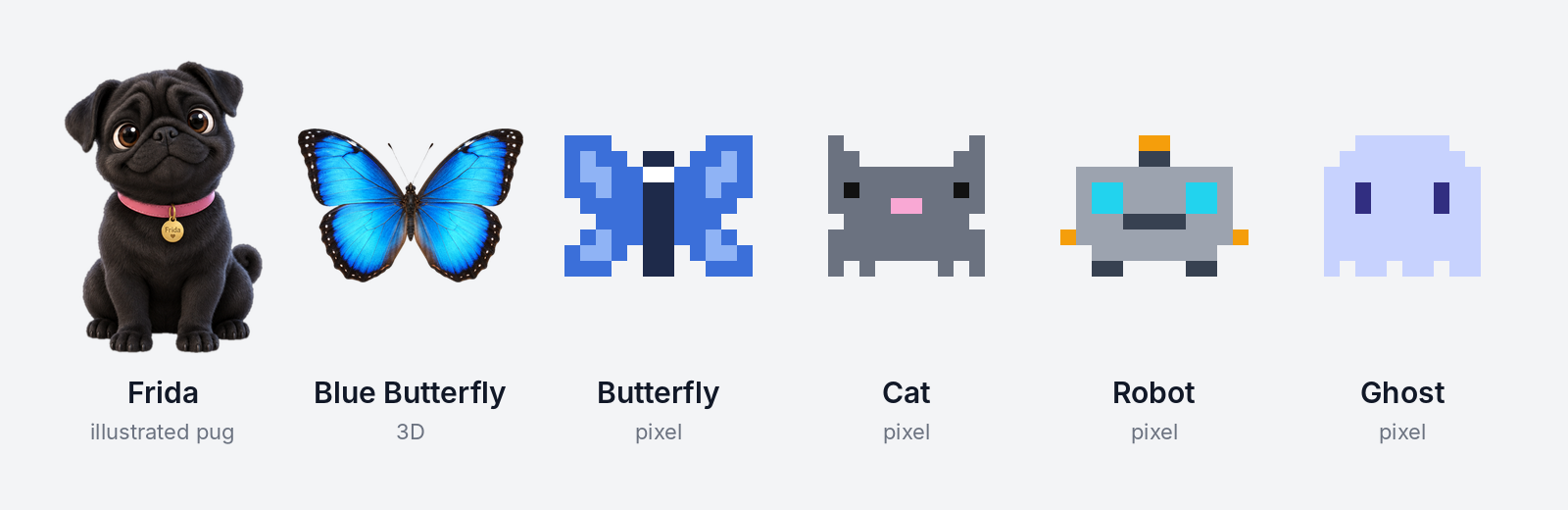
- Frida, a black pug in animated-film style: she barks when Claude needs you, raises a paw when your work is ready for review, and half-closes her eyes when something is stuck
- Blue Butterfly, a 3D blue morpho: she turns toward your cursor, gets startled when it arrives too fast, and lands with open wings when the work is done
- Butterfly, Cat, Robot and Ghost, four pixel characters whose eyes follow your cursor
- Your own: turn a photo of your pet into a character, turn any butterfly photo into a 3D butterfly, or ask Claude to draw a pixel character for you
Private by design
The mascot runs on your own computer and makes no network calls. For each conversation it keeps the status, the project folder and the first 120 characters of your last request. The quick chat goes through your own Claude Code.
Good to know
"Working" and "done" are reliable. "Needs you" is exact when Claude asks you a question and an estimate when Claude is waiting for a permission. For exact states and auto-start, install the free plugin version with hooks from the repository.
Requirements
Python 3 and Claude Code. Pillow for Frida, the Blue Butterfly and photo characters; without it, the pixel characters still work. The mascot's texts and character names are in Portuguese.
Free and open source (MIT): https://github.com/Thathaqqq/mascote-flutuante
Status tracking works only with Claude Code, not with other assistants like Cursor or Codex. "Needs you" is an estimate when Claude is waiting for a permission, so a long-running command may show as "needs you". Landing on the active window is Windows only. The mascot's texts and character names are in Portuguese. Requires Python 3 (and Pillow for Frida, the Blue Butterfly and photo characters).
How to use
- 1
Connect your agent to the Agensi MCP
Copy the prompt and paste it into Claude, ChatGPT, Cursor or any agent that supports MCP. It sets up the connection for you. Manual setup
- 2
Sign in to Agensi
Your agent shows a sign-in link. Sign in and click Allow.
- 3
Ask for what you need
Your agent loads this skill and uses it on your task. It always asks before any payment.
Reviews
No reviews yet
Be one of the first to try it. Every listed skill goes through the trust checks below.
Security scanned
Checked by our 8-point scan before listing
Fresh listing
Recently published to Agensi
Free forever
No account required to browse
Trust & safety
Security scan
Security scan passed 6 days ago
- Free with an Agensi account
Requires
 Python
Permissions
No outbound network connections. The mascot only opens a local port on 127.0.0.1 so that a single mascot runs at a time and receives your commands. The quick chat runs your own Claude Code command. Files: reads the Claude Code conversation history and writes its own state and settings in the mascote folder inside your Claude Code config folder.