Works with the AI Agents you already use
 Claude Code
 Cursor
 Codex CLI
 Muse
 Dots+21 moreClaude CodeCursorCodex CLIMuseDots
 Manus
 Grok
 Grok Bot+18 agents
LoopBrake: Agent Edit-Thrash & Doom-Loop Breaker
Detect and break agent edit-thrashing, shell-write bypasses, and tool-error doom loops in coding transcripts.
$6

LoopBrake: Agent Edit-Thrash & Doom-Loop Breaker
Example session with this skill installed
Audit my recent Claude Code transcripts for any high-severity edit thrashing or shell bypasses.
- Read your context and instructions
- Compiled the loopbrake
The audit of ~/.claude/projects is complete. I analyzed 14 session transcripts and identified 3 sessions with high-severity loops.
LoopBrake Audit Report
| Session ID | Score | Rule | Findings |
|---|---|---|---|
cl-8f2j | 42 | LPB001 | CRITICAL: 6 mutations to src/auth.ts. |
cl-8f2j | 42 | LPB004 | MEDIUM: 2 shell-write bypasses via sed -i. |
cl-9a11 | 65 | LPB009 | HIGH: 3 consecutive FileNotFound tool errors. |
cl-3k04 | 18 | LPB010 | CRITICAL: CWD escape detected. Shell reset to ~. |
cl-4m22 | 92 | LPB007 | INFO: Documentation updates only (README.md). |
Analysis Summary
The agent is currently thrashing on src/auth.ts. It attempted to bypass the structured Edit tool twice using sed commands after the first three edits failed to pass linting. In session cl-3k04, the agent deleted its own working directory, causing a CWD escape to the user home directory.
Next steps
- Run
node scripts/loopbrake.mjs --emit-hookto install the circuit-breaker. - Review
reference/loopbrake-playbook.mdfor theLPB010remediation strategy. - Manually inspect
src/auth.tsto resolve the root cause of the linting failures.
Connects securely to your tools. The creator never sees your data.
About this skill
AI coding agents often get stuck in expensive loops, repeatedly patching the same file or retrying failing commands. LoopBrake detects and prevents agent edit-thrashing and tool-error doom loops across Claude Code and Codex CLI transcripts.
What it does
- Edit-Thrash Detection: Identifies when an agent performs four or more mutations on a single source file in a session.
- Shell-Write Bypass Tracking: Catches agents attempting to bypass structured
Edittools usingsed,cat, orteevia shell commands. - Doom-Loop Prevention: Flags consecutive tool-error streaks and identical shell command retries that drain tokens without progress.
- Circuit-Breaker Injection: Generates
PreToolUseandPostToolUsehooks to halt execution when safety thresholds are reached. - CWD Escape Monitoring: Detects deleted-sandbox escapes where the agent loses its worktree and resets to the home directory.
How it works
- Run the audit script against
~/.claude/projectsor~/.codex/sessionsto analyze local JSONL transcripts. - Review the Loop-Safety Score (0–100) and specific rule violations (
LPB001toLPB014). - Use the
--emit-hookflag to generate a circuit-breaker script for your agent harness. - Integrate the analyzer into CI pipelines using
--fail-on highto block low-quality agent PRs.
Frameworks & tools
This tool works with Claude Code, Codex CLI, and custom tool-calling harnesses. It is built with Node.js and processes JSONL session transcripts.
Why this beats prompting it yourself
Standard prompts cannot track internal state or mutation counts across multiple turns effectively. LoopBrake uses deterministic log analysis to catch shell-level bypasses that agents use to hide their own failures from system prompts.
Use cases
- Auditing local agent sessions to identify why a task failed or wasted tokens.
- Setting up a CI gate to fail automated agent runs that exhibit looping behavior.
- Hardening agent environments against "shell-write" bypasses of governed edit tools.
- Automating the cooling-off period when an agent hits a three-error streak.
Known limitations
Currently optimized for Claude Code and Codex CLI transcript formats. Analysis is performed on JSONL session logs.
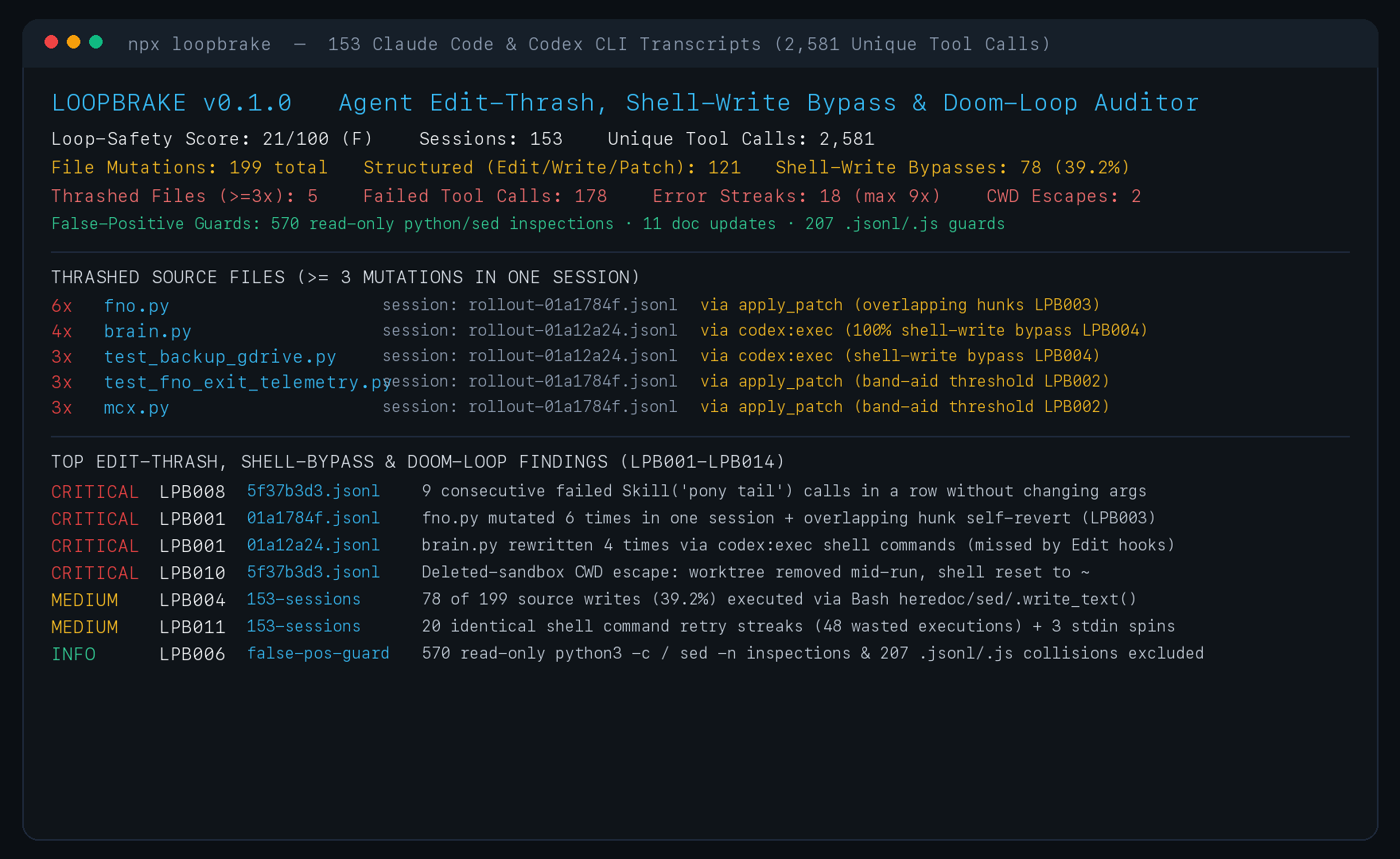
Optimized for Claude Code and Codex CLI JSONL logs. Mutation tracking is scoped to the current session transcript. Requires Node.js to run the audit and hook scripts.
How to use
- 1
Connect your agent to the Agensi MCP
Copy the prompt and paste it into Claude, ChatGPT, Cursor or any agent that supports MCP. It sets up the connection for you. Manual setup
- 2
Sign in to Agensi
Your agent shows a sign-in link. Sign in and click Allow.
- 3
Ask for what you need
Your agent loads this skill and uses it on your task. It always asks before any payment.
Reviews
No reviews yet
Be one of the first to try it. Every listed skill goes through the trust checks below.
Security scanned
Checked by our 8-point scan before listing
Fresh listing
Recently published to Agensi
Money-back guarantee
Doesn't do what its page promises? You get your money back.
Trust & safety
Security scan
Security scan passed 11 days ago
Requires
 Node.js