More screenshots
Works with the AI Agents you already use
 Claude Code
 Cursor
 Codex CLI
 Muse
 Dots+21 moreClaude CodeCursorCodex CLIMuseDots
 Manus
 Grok
 Grok Bot+18 agents
Jira Delivery
Start Jira tickets with a ready-to-build brief, check your branch against the acceptance criteria before the PR, and hand off to QA.
Free

Jira Delivery
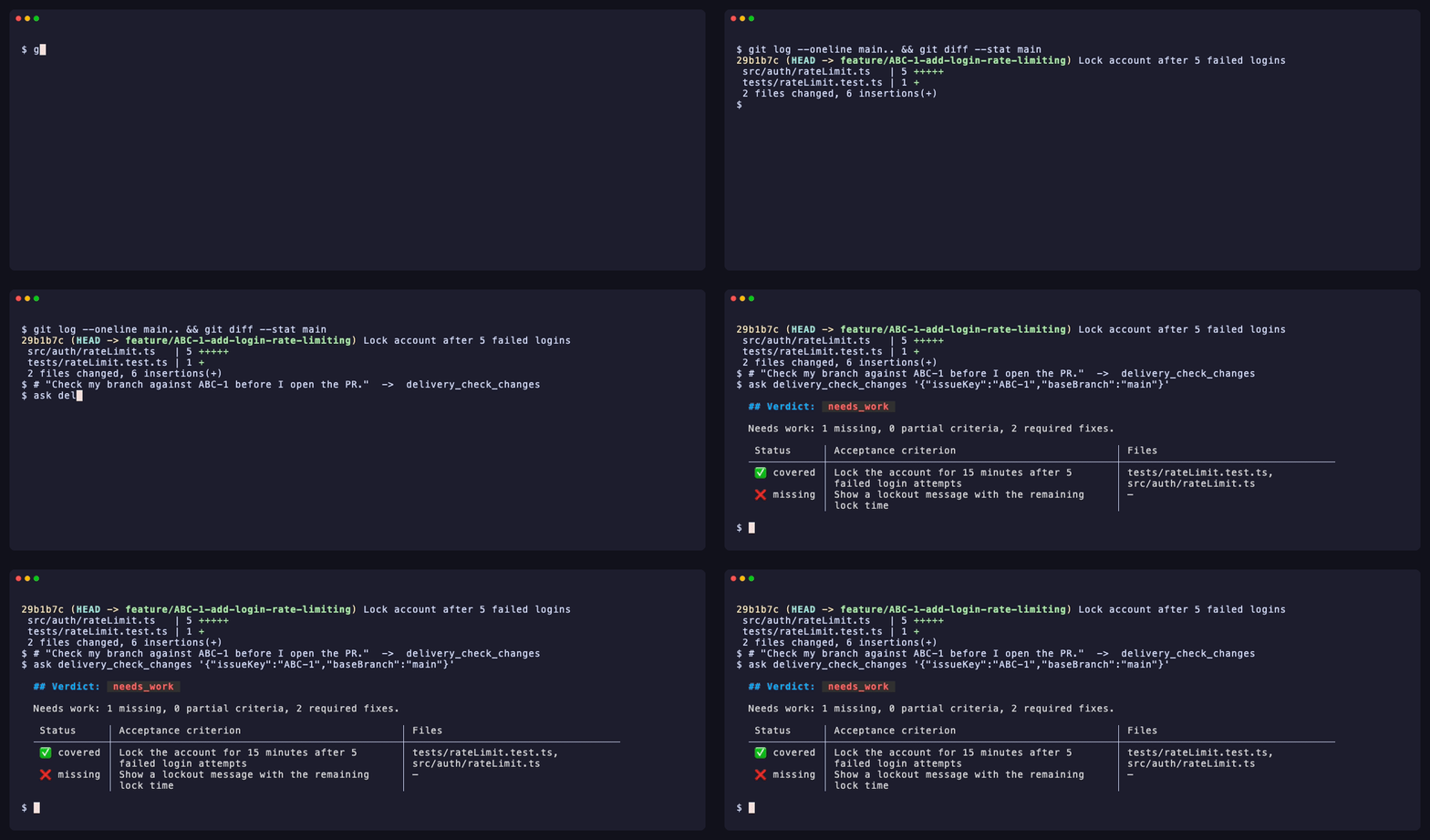
Example session with this skill installed
Check my branch against ABC-1 before I open the PR.
- Read your context and instructions
- Compiled the jira delivery
I checked your branch (2 files changed vs main) against ABC-1 "Add login rate limiting".
Verdict: needs_work
Needs work: 1 missing, 0 partial criteria, 2 required fixes.
| Status | Acceptance criterion | Files |
|---|---|---|
| ✅ covered | Lock the account for 15 minutes after 5 failed login attempts | src/auth/rateLimit.ts, tests/rateLimit.test.ts |
| ❌ missing | Show a lockout message with the remaining lock time | — |
Alignment: MOSTLY_ALIGNED (67/100), tests added.
Definition of Done: BLOCKED_BY_REQUIREMENT_GAP (76/100)
| Required fix | Why |
|---|---|
| Resolve the Jira conflict | The ticket and its comments disagree on a requirement; confirm which one wins before the PR |
| Explain the auth change | src/auth/ is security-sensitive; say in the PR what changed and how it was tested |
Impact: Auth / Permissions. Services that rely on the session or token may be affected.
Next steps
- Add the lockout message with the remaining lock time, and a test for it.
- Ask the product owner which requirement wins, then note it in the PR.
- Run the check again. When it says
ready_for_pr, I can write the QA handoff.
Connects securely to your tools. The creator never sees your data.
About this skill
Jira hygiene and ticket context often get lost when switching between the browser and the terminal. This skill connects your agent directly to Jira Cloud, ensuring every line of code aligns with acceptance criteria and definition of done.
What it does
- Prepare work briefs scans tickets for blockers, gaps, and clarifying questions before you start coding.
- Automated verification checks your current branch against ticket acceptance criteria to identify missing logic or test coverage.
- Generate handoffs produces QA handoff notes, release notes, and test strategies based on your actual code changes.
- Traceability mapping generates a matrix linking specific requirements to the code files and tests that implement them.
- Write-back management handles status transitions, comments, and PR linking directly from the agent with a confirmation safety layer.
How it works
- "I'm starting ABC-101": jira_prepare_work_brief returns readiness, blockers, open questions, acceptance criteria and a suggested branch name.
- Build the feature as usual.
- "Check my branch against ABC-101": delivery_check_changes compares your local git diff with the acceptance criteria and Definition of Done and returns one verdict: ready_for_pr, needs_work or insufficient_evidence.
- "Write the QA handoff": delivery_generate writes the QA handoff, release notes, test strategy or reviewer report. With writes enabled, the agent can post it to Jira after you approve the preview.
Frameworks & tools
Requires the jira-delivery-mcp server (Node.js 22+). Connects to Jira Cloud and Confluence via API tokens. Compatible with any agent supporting MCP tools, including Claude Code and Cursor.
Why this beats prompting it yourself
Manual prompting requires copy-pasting ticket descriptions which often lack custom fields or linked Confluence specs. This skill uses a specialized MCP server to fetch deep ticket metadata, perform actual code-to-criteria alignment checks, and enforce a strict confirmation flow for Jira writes.
Use cases
- Start a new feature branch by generating a brief that flags missing acceptance criteria.
- Perform a pre-PR audit to ensure no Definition of Done items were skipped during development.
- Generate technical release notes for a specific audience based on git diffs and Jira metadata.
- Create a traceability matrix for compliance-heavy environments where every requirement must map to code.
Known limitations
Requires a running Node.js MCP server on the local machine. Write operations are disabled by default and require manual environment variable configuration and user confirmation tokens.
Requires Node.js 22+. Jira writes require JIRA_ENABLE_WRITES=true. Does not support self-hosted Jira Server/Data Center; requires Jira Cloud.
How to use
- 1
Connect your agent to the Agensi MCP
Copy the prompt and paste it into Claude, ChatGPT, Cursor or any agent that supports MCP. It sets up the connection for you. Manual setup
- 2
Sign in to Agensi
Your agent shows a sign-in link. Sign in and click Allow.
- 3
Ask for what you need
Your agent loads this skill and uses it on your task. It always asks before any payment.
Reviews
No reviews yet
Be one of the first to try it. Every listed skill goes through the trust checks below.
Security scanned
Checked by our 8-point scan before listing
Fresh listing
Recently published to Agensi
Free forever
No account required to browse
Trust & safety
Security scan
Security scan passed 23 days ago
- Free with an Agensi account
Requires
 Node.js
Permissions
The skill contains no scripts. It drives the open-source jira-delivery-mcp server, which runs locally and talks only to your own Atlassian site using credentials from environment variables (never asked for in chat). It reads by default; Jira writes are off unless JIRA_ENABLE_WRITES=true, and every write is previewed and needs your approval.