Works with the AI Agents you already use
 Claude Code
 Cursor
 Codex CLI
 Muse
 Dots+21 moreClaude CodeCursorCodex CLIMuseDots
 Manus
 Grok
 Grok Bot+18 agents
Error Journal Pro
A durable, file-based error journaling system to record, search, and resolve recurring repository bugs.
$5.99

Error Journal Pro
Example session with this skill installed
I just hit a 'TypeError: cannot read properties of undefined (reading id)' in src/routes/users.ts while testing the new auth flow. Record this in the journal.
- Read your context and instructions
- Compiled the error journal pro
I have recorded this error in docs/error-journal.md. Since this is a new signature, I have assigned it ID E-0042 and set the severity to medium.
Error Journal Entry Created
| Field | Value |
|---|---|
| Entry ID | E-0042 |
| Status | Open |
| Signature | typeerror: cannot read properties of undefined (reading id) |
| Location | src/routes/users.ts |
| Context | Testing new auth flow; appears during user profile retrieval. |
| Action | Verbatim error and stack trace appended to docs/error-journal.md. |
Next steps
- Run
error-journal.sh search "reading id"to check if similar auth errors were recorded previously. - Once you identify the fix, use
error-journal.sh resolve E-0042 --fix "Explain your solution here"to close the loop. - Reference
E-0042in your commit message to link the code change to this journal entry.
Connects securely to your tools. The creator never sees your data.
About this skill
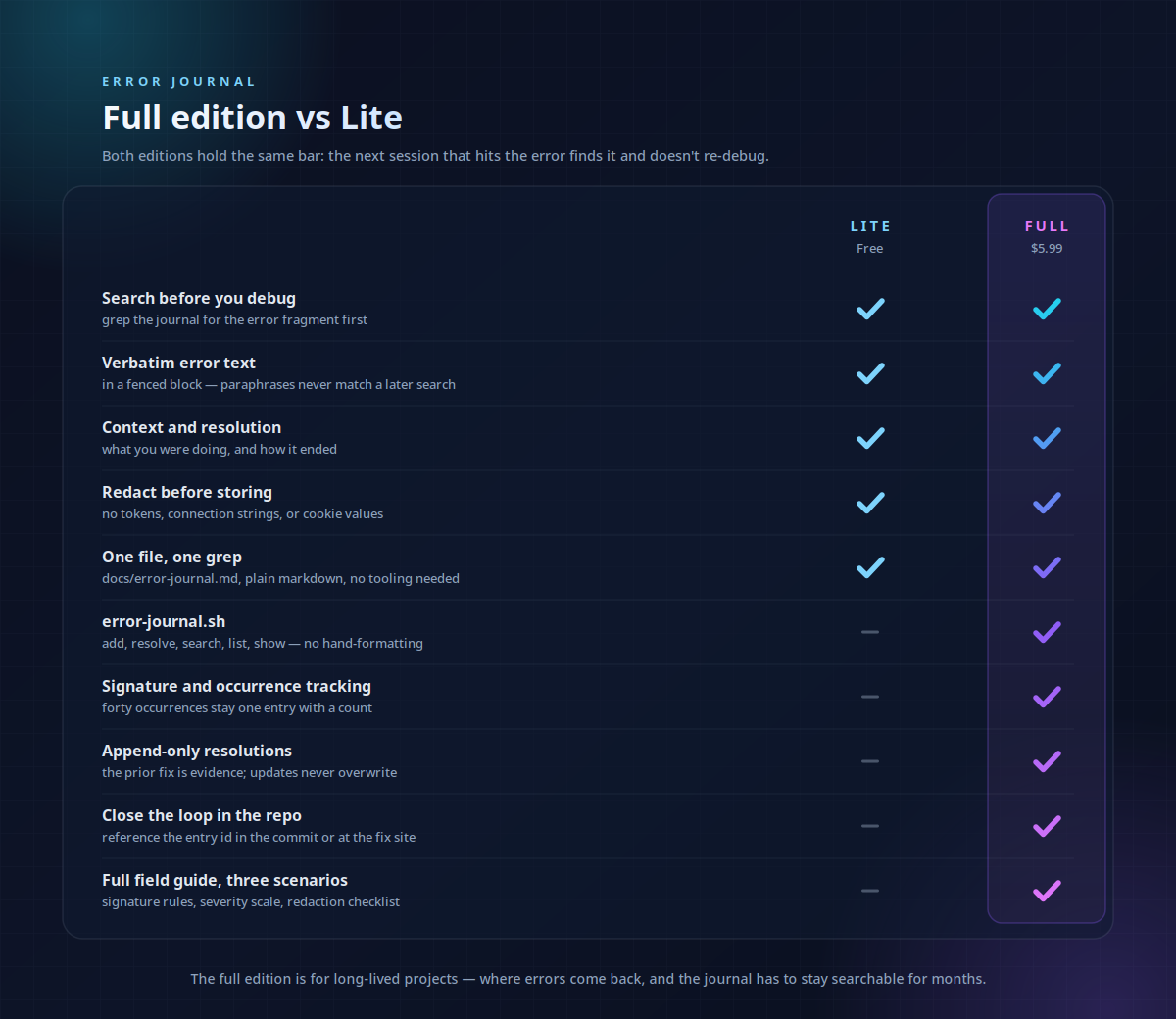
Debugging the same error twice is a waste of engineering resources. This skill implements a durable error journaling system that ensures every difficult fix is recorded, searchable, and reusable. It moves beyond ephemeral logs by capturing the developer context, the verbatim error signature, and the specific resolution that actually worked.
What it does
- Standardized Logging records verbatim error messages, stack traces, and environmental context into a central markdown file.
- Signature Tracking prevents duplicate entries by collapsing whitespace and normalizing error messages into unique signatures with occurrence counts.
- Semantic Search allows developers to query the journal by error code, function name, or partial message before starting a new debug session.
- Resolution Archiving maps successful fixes to specific commits or PRs, providing a direct link between the failure and the solution.
- Secret Redaction enforces a workflow for removing tokens, cookies, and connection strings from logs before they hit the repository.
How it works
- Search the journal using a fragment of the error message to see if the team has encountered and solved this specific issue before.
- Log new errors immediately using the
addcommand, capturing the verbatim stack trace and current task context. - Resolve entries once a fix is found, appending the resolution details and referencing the relevant commit ID.
- Audit the journal periodically to identify high-frequency failures that require systemic architectural changes rather than one-off fixes.
Frameworks & tools
This tool uses a bash script (error-journal.sh) to manage a plain Markdown file (docs/error-journal.md). It relies on standard Unix utilities like grep and sed for search and entry management, making it compatible with any repository structure.
Why this beats prompting it yourself
Generic AI prompts often paraphrase errors or suggest generic fixes that ignore your specific codebase history. This skill enforces a strict data schema and signature-matching logic that turns your repository into a self-documenting knowledge base. It ensures that tribal knowledge about complex bugs is captured in a format that both humans and LLMs can query reliably.
Use cases
- Recording the fix for an intermittent race condition that only appears in CI environments.
- Onboarding new developers by providing a searchable history of common environment setup pitfalls.
- Tracking the recurrence of specific API failures following a major middleware refactor.
- Documenting "won't fix" edge cases with detailed explanations of why they occur.
Known limitations
Requires manual invocation to log or resolve errors; it does not automatically scrape system logs. The signature matching may fail if error messages contain unique IDs or timestamps that aren't manually redacted.
Requires manual triggers to log and resolve. Signature matching requires manual placeholder replacement for unique IDs/timestamps. Best suited for errors that take >5 mins to debug.
How to use
- 1
Connect your agent to the Agensi MCP
Copy the prompt and paste it into Claude, ChatGPT, Cursor or any agent that supports MCP. It sets up the connection for you. Manual setup
- 2
Sign in to Agensi
Your agent shows a sign-in link. Sign in and click Allow.
- 3
Ask for what you need
Your agent loads this skill and uses it on your task. It always asks before any payment.
Reviews
No reviews yet
Be one of the first to try it. Every listed skill goes through the trust checks below.
Security scanned
Checked by our 8-point scan before listing
Fresh listing
Recently published to Agensi
Money-back guarantee
Doesn't do what its page promises? You get your money back.
Trust & safety
Security scan
Security scan passed 1 month ago