More screenshots
Works with the AI Agents you already use
 Claude Code
 Cursor
 Codex CLI
 Muse
 Dots+21 moreClaude CodeCursorCodex CLIMuseDots
 Manus
 Grok
 Grok Bot+18 agents
Codex Controls Claude
Your main agent plans and reviews. Claude Code builds. Delegate complete engineering tasks with clear scope, parallel workers and acceptance checks.
$9.99

Codex Controls Claude
Example session with this skill installed
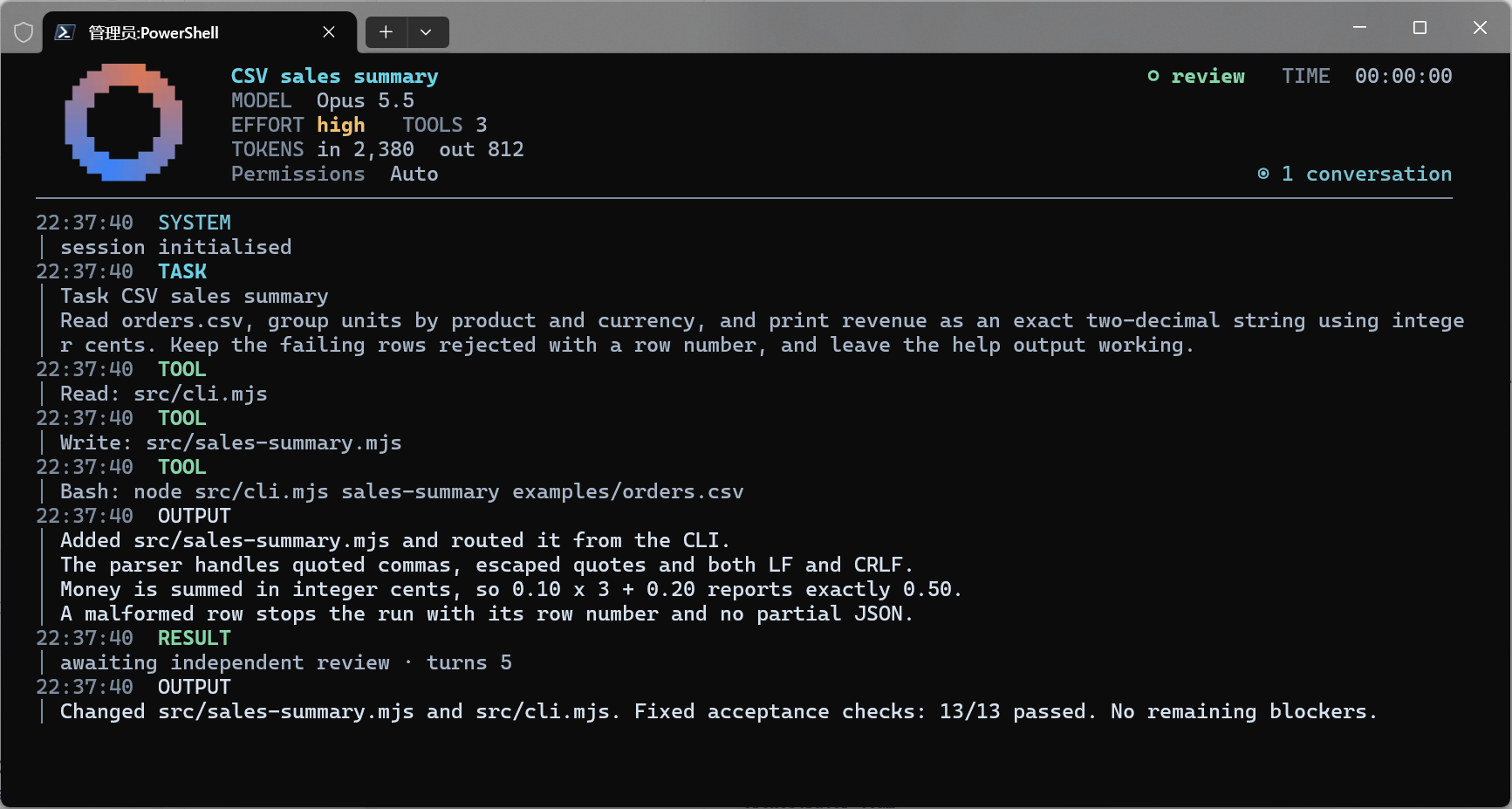
Use Codex Controls Claude to add a sales-summary command to this CLI project. Read the existing code, plan the work, and delegate implementation to Claude Code. Group CSV orders by product and currency, calculate exact totals, and handle quoted fields and bad rows. Review the code and rerun the acceptance checks before handing over the finished feature.
- Read your context and instructions
- Compiled the codex controls claude
- Generated the data export
Completed: CSV sales summaries, ready for review
The main agent planned the feature, dispatched implementation to Claude Code, and independently reviewed the completed changes. Claude Code delivered a working command, clear error handling and usage documentation. All 13 acceptance checks passed.
MCP tools used in this demonstration
| Tool | Role in the task |
|---|---|
orchestrator_plan | Defined the sales-summary task and its fixed acceptance checks. |
orchestrator_dispatch | Started Claude Code with the implementation brief. |
orchestrator_wait | Waited for the worker to return a review candidate. |
orchestrator_review | Recorded the supervisor's review and reran the 13 acceptance checks. |
From request to finished feature
| Stage | Owner | Delivered |
|---|---|---|
| Plan | Main agent / supervisor | Reviewed the starting CLI, defined the feature scope and fixed the acceptance checks before implementation. |
| Build | Claude Code | Implemented CSV parsing, input validation, product-and-currency grouping, and the new command. |
| Review | Main agent / supervisor | Inspected the actual code and documentation, checked the sample totals, and reran the original acceptance checks. |
| Handoff | Main agent / supervisor | Accepted the working feature with its command, output, documentation and verification results. |
What the finished command does
Run
node src/cli.mjs sales-summary examples/orders.csv
The command reads the orders, groups each product and currency separately, and returns units and revenue. Amounts are calculated in integer cents, so decimal prices do not introduce floating-point rounding errors. Quoted product names, escaped quotes and CRLF files are supported.
Actual output from the demo project
| Product | Currency | Units | Revenue |
|---|---|---|---|
| Coffee | EUR | 1 | 3.20 |
| Coffee | USD | 5 | 17.50 |
| Tea, green | USD | 1 | 4.25 |
Acceptance result
13 of 13 checks passed. The checks covered grouping, exact-cent arithmetic, quoted fields, CRLF input, empty data, invalid quantities and prices, missing currency, wrong column counts, broken quotes, missing files, and the existing help command.
Bad input produces a clear row error and a nonzero exit code. It writes no partial JSON to stdout, so a failed import cannot look like a successful report.
Delivered files
src/sales-summary.mjs: CSV parsing, validation and aggregation.src/cli.mjs: the new command and error reporting.README.md: input rules, usage, actual output and verification instructions.
This completed example used a small demonstration project with synthetic orders. The implementation, command output and acceptance checks were run and independently reviewed through the connected workflow.
1793717083291-lyh5.png
CSV · data export
Example file from a real run - the skill writes it into your workspace.
Connects securely to your tools. The creator never sees your data.
About this skill
Give your main agent a Claude Code implementation team
Your main agent plans and reviews. Claude Code builds. Delegate complete engineering tasks with clear scope, parallel workers and acceptance checks.
The supervisor directs local workers, answers questions during execution, and checks the finished files before accepting the result.
What makes the workflow useful
- Delegate the work and keep control of the decisions. The supervisor sets the scope and acceptance checks before a worker starts. You can keep architectural choices with the main agent while Claude Code handles the implementation.
- Review actual changes before moving on. A worker's completion becomes a review candidate. The supervisor inspects the files and diff, and the runtime reruns the task's fixed checks. Failed checks block acceptance, and findings can go back for repair.
- Run independent tasks in parallel. Dispatch up to three workers on independent tasks and keep later stages waiting until their prerequisites pass review. The supervisor coordinates file scopes when work could overlap.
- Resolve questions during the task. Workers can ask the supervisor for clarification. The supervisor can answer, queue guidance for the next turn boundary, or interrupt a task when a correction needs immediate attention.
- Wait for useful events. Completion, questions, permission decisions and failures wake the supervisor. A pending wait can last up to 20 minutes and returns when an actionable event arrives, so ordinary progress does not require repeated status requests.
- Continue work with its history. Saved conversations, task records and checkpoints support explicit continuation after interruptions or budget stops. The supervisor decides when to continue, request repairs or start a new context.
- Use your existing Claude Code environment. Workers use your configured model, authentication, enabled tools, MCP servers, hooks and permissions. On Windows, each running worker has a terminal dashboard showing reported activity, elapsed time and execution state.
Good fits
- Refactor several modules with a review between stages.
- Collect research evidence before choosing an implementation.
- Build independent parts of a feature in parallel, then check the combined result.
- Continue a long engineering task with recorded requirements, questions and review findings.
What you receive
The purchase contains the instruction skill, orchestration policies, setup guidance and workflow references for your main agent. The separate local MCP runtime supplies the ten orchestration tools and is downloaded through NPX. Your Claude Code subscription, API access and provider charges are separate.
MCP tools
| Tool | What it does |
|---|---|
orchestrator_plan | Define the goal, task contracts and acceptance checks. Manage continuation and session lifecycle. |
orchestrator_dispatch | Send a ready task to a local Claude Code worker. |
orchestrator_wait | Wait for completion, a question, a permission decision or a failure. |
orchestrator_review | Review the current artifacts and rerun the task's original checks before acceptance. |
orchestrator_status | Inspect a task's results, checks, budget and recovery evidence. |
orchestrator_message | Send guidance, interrupt a turn or answer a worker's question. |
orchestrator_respond_permission | Respond to a pending native permission request. |
orchestrator_cancel | Stop the selected run while preserving other workers. |
orchestrator_team | Coordinate parallel workers and tasks with dependencies. |
orchestrator_doctor | Check the local configuration without calling a model. |
Connect the local MCP runtime
Install Node.js 22 or newer with npm/NPX and make sure your local Claude Code CLI is installed and authenticated. Windows workers also require Windows Terminal and .NET 10 Runtime.
Run this command to check prerequisites and print the configuration to add:
npx --yes --package codex-controls-claude-mcp@latest -- codex-controls-claude-mcp setup
The command prints guidance and configuration. It does not edit your host's configuration file. NPX downloads the runtime selected by the latest npm tag on first use; the runtime then runs on your computer.
The registry argument is optional. NPX uses your configured npm registry. If a mirror cannot find the package or has an outdated latest tag, add --registry=https://registry.npmjs.org/ to the NPX arguments. @latest follows the latest published release; pin a version if you need repeatable deployments.
JSON configuration
For a host that uses an mcpServers JSON configuration, merge this entry into its existing configuration:
{
  "mcpServers": {
    "claude-orchestrator": {
      "type": "stdio",
      "command": "npx",
      "args": ["-y", "codex-controls-claude-mcp@latest"],
      "env": {"CCC_WAIT_MS": "1200000"}
    }
  }
}
Keep your other server entries. Use the host's documented settings to allow a tool call to remain open for at least 1,260 seconds. CCC_WAIT_MS controls the runtime's wait; it does not raise the host's own timeout. This JSON example describes the connection. Host-specific timeout and supervision behavior still need verification.
Codex configuration
Codex uses TOML in ~/.codex/config.toml:
[mcp_servers.claude-orchestrator]
command = "npx"
args = ["--yes", "--package", "codex-controls-claude-mcp@latest", "--", "codex-controls-claude-mcp"]
startup_timeout_sec = 120
tool_timeout_sec = 1260

[mcp_servers.claude-orchestrator.env]
CCC_WAIT_MS = "1200000"
Reconnect the MCP server or restart the host, then confirm all ten orchestrator_* tools appear. If a Windows host cannot launch npx directly, run the setup command with --cmd-shim for its alternative configuration. Existing users should preserve their runtime data directory when changing connections.
The published package and full runtime instructions are available at npm.
Before you buy
The supervisor workflow has been validated with Codex. Other hosts need local stdio MCP support and compatible long-running tool calls. Invoke the skill explicitly and keep the supervisor session active to handle events. Review and checks help catch mistakes; they do not guarantee correct code.
Connect the separate local MCP runtime before using the skill. The @latest configuration follows the latest published npm release. Up to three dispatched workers share the execution pool across connected chats using the same runtime data directory. Invoke the skill explicitly and keep the supervisor session active. The full supervisor workflow is validated with Codex; other hosts may impose different tool timeouts. Claude Code authentication and model charges are your responsibility. Windows workers require Windows Terminal and .NET 10 Runtime.
How to use
- 1
Connect your agent to the Agensi MCP
Copy the prompt and paste it into Claude, ChatGPT, Cursor or any agent that supports MCP. It sets up the connection for you. Manual setup
- 2
Sign in to Agensi
Your agent shows a sign-in link. Sign in and click Allow.
- 3
Ask for what you need
Your agent loads this skill and uses it on your task. It always asks before any payment.
Reviews
No reviews yet
Be one of the first to try it. Every listed skill goes through the trust checks below.
Security scanned
Checked by our 8-point scan before listing
Fresh listing
Recently published to Agensi
Money-back guarantee
Doesn't do what its page promises? You get your money back.
Trust & safety
Security scan
Security scan passed 14 days ago
Requires
Permissions
The instruction skill supplies the workflow. The separately installed local MCP runtime launches Claude Code, reads its existing settings, and writes task history and artifacts. Workers use the project files and tools authorized for the task. NPX contacts npm to fetch the runtime; Claude Code uses the user's configured provider, authentication, hooks and permissions.