More screenshots
Works with the AI Agents you already use
 Claude Code
 Cursor
 Codex CLI
 Muse
 Dots+21 moreClaude CodeCursorCodex CLIMuseDots
 Manus
 Grok
 Grok Bot+18 agents
Codereel
Turn code into promo videos: real app UI, cuts on the beat, and one command to re-render when the copy, size or track changes.
$19

Codereel
Example session with this skill installed
Create a 30s 9:16 reel for our new dashboard. Use a 128 BPM grid, Apple-style big type, and real UI footage. Provide three audio variants.
- Read your context and instructions
- Compiled the codereel
- Generated the image
Built the dashboard reel as code. film.html holds the timeline: renderAt(ms) drives every layer and cuts land on the 128 BPM grid (one beat = 468.75 ms). cuts.txt and hits.json list the cut and hit points for the audio.
| Asset | Details |
|---|---|
| Video | 1080x1920, 30 fps, H.264, yuv420p, 30.0 s |
| Audio A / B / C | upbeat electronic / minimal tech / cinematic piano, about -14 LUFS each |
| SFX | synthesised taps and chimes on the hit points |
| QA | ffprobe clean, no black or frozen stretches, OCR of sampled frames: no typos |
nice -n 10 node render.mjs
ffmpeg -i silent.mp4 -i mix-A.wav -c:v copy -c:a aac -b:a 192k -af loudnorm=I=-14:TP=-1.5 -shortest promo-A.mp4
Delivered: three MP4 versions, the silent master, a cover image, captions and LICENSES.md.
Next steps
- Watch the three versions and pick one.
- Tell me any copy, timing or track change; I edit the line and re-render.
- Nothing is re-rendered until you give direction.
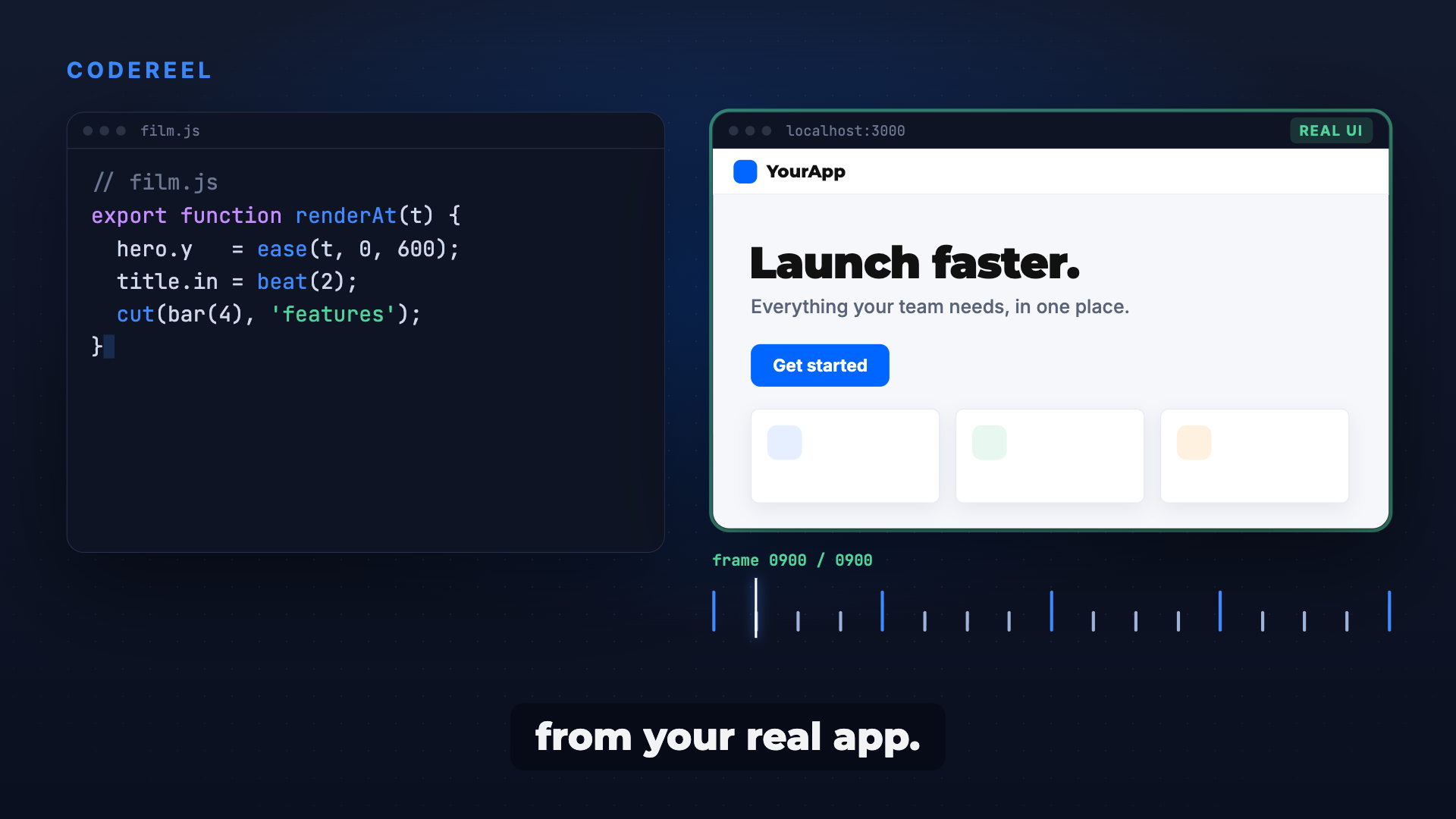
film.html
PNG · 1536×1024
Example file from a real run - the skill writes it into your workspace.
Connects securely to your tools. The creator never sees your data.
About this skill
Your app is great, but the demo video stutters, eats a weekend in an editor, and has to be redone for every small change. Ask your agent for "a 30 second promo for the app" and Codereel builds the video as a web page: every layer is a function of time, cuts land on the beat, and Playwright renders it frame by frame into an MP4 with music and sound effects mixed in.
Why it's different
- Real UI, never AI guesses: footage comes from your production build or approved posters, so buttons and text look exactly like the product.
- Change a line, render again: new copy, new aspect ratio or new track is one edit and one command, with the same frames every time.
- No credits, no licence fees: plain HTML, Playwright and ffmpeg; music composed in code or a track you have the rights to.
- Built from real projects: 16 pitfalls that actually happened, each with its guard.
What it does
- Timeline in code:
renderAt(ms)drives every layer, with cuts on a 120 or 128 BPM grid and a seeded random source so re-renders match. - Multi-format output: MP4 in 9:16 and 16:9, 7 to 60 seconds, plus GIF export for stickers and chat previews.
- Audio in versions: 2-3 music options with SFX on the hit points, ducked and normalised to about -14 LUFS, with a
LICENSES.md. - QA before delivery: ffprobe checks, black and frozen frame detection, and OCR of sampled frames for typos and stale numbers.
- Style variants: Apple-style commercial rules (one idea per shot, one hero colour, hook in the first 3 s), poster reels and generative backgrounds.
How it works
- Concept first: duration, aspects, style, BPM grid, scene list and CTA agreed before anything renders.
- Footage: real app capture from a production build, with IDs scrambled and dates frozen.
- Film:
film.htmlwith a time-driven timeline; cut and hit points exported for the audio. - Render and mix: Playwright seeks each frame into ffmpeg, then the audio versions are muxed without re-encoding the video.
- QA and handoff: contact sheet, OCR and probe checks, then the owner picks a version.
Frameworks & tools
Node.js, Playwright, ffmpeg and optionally GSAP. Python with numpy/scipy for music and SFX composed in code. Tesseract for the OCR pass if installed.
Use cases
- App intros and feature launches with real UI and beat-synced type.
- Weekly social reels made from approved posters, no new shoot.
- One campaign exported to 9:16 and 16:9 from the same source.
- Quick re-cuts when pricing, copy or the soundtrack changes.
Known limitations
Needs Node.js, Playwright and ffmpeg on your machine. Not for live-action, interview or talking-head editing, and it does not generate AI footage.
Requires local Playwright and ffmpeg installations. Not designed for live-action video editing, interviews, or generative AI character animation.
How to use
- 1
Connect your agent to the Agensi MCP
Copy the prompt and paste it into Claude, ChatGPT, Cursor or any agent that supports MCP. It sets up the connection for you. Manual setup
- 2
Sign in to Agensi
Your agent shows a sign-in link. Sign in and click Allow.
- 3
Ask for what you need
Your agent loads this skill and uses it on your task. It always asks before any payment.
Reviews
No reviews yet
Be one of the first to try it. Every listed skill goes through the trust checks below.
Security scanned
Checked by our 8-point scan before listing
Fresh listing
Recently published to Agensi
Money-back guarantee
Doesn't do what its page promises? You get your money back.
Trust & safety
Security scan
Security scan passed 29 days ago
Requires
 Python