More screenshots
Works with the AI Agents you already use
 Claude Code
 Cursor
 Codex CLI
 Muse
 Dots+21 moreClaude CodeCursorCodex CLIMuseDots
 Manus
 Grok
 Grok Bot+18 agents
CI Babysitter: Fix Failing PR Checks
Guide your coding agent through CI logs, local tests, small code fixes, and fresh checks on your pull request.
$5

CI Babysitter: Fix Failing PR Checks
Example session with this skill installed
Use ci-babysitter to fix CI on PR #1. Read the logs, reproduce the failure, fix the source, and push to this PR branch. Keep the tests and workflow unchanged. Stop after three rounds.
- Read your context and instructions
- Compiled the ci babysitter
Real validation session: synthetic GitHub fixture
CI status: Both existing checks passed after one fix round. Limit: three rounds.
PR: #1 in our private test repository.
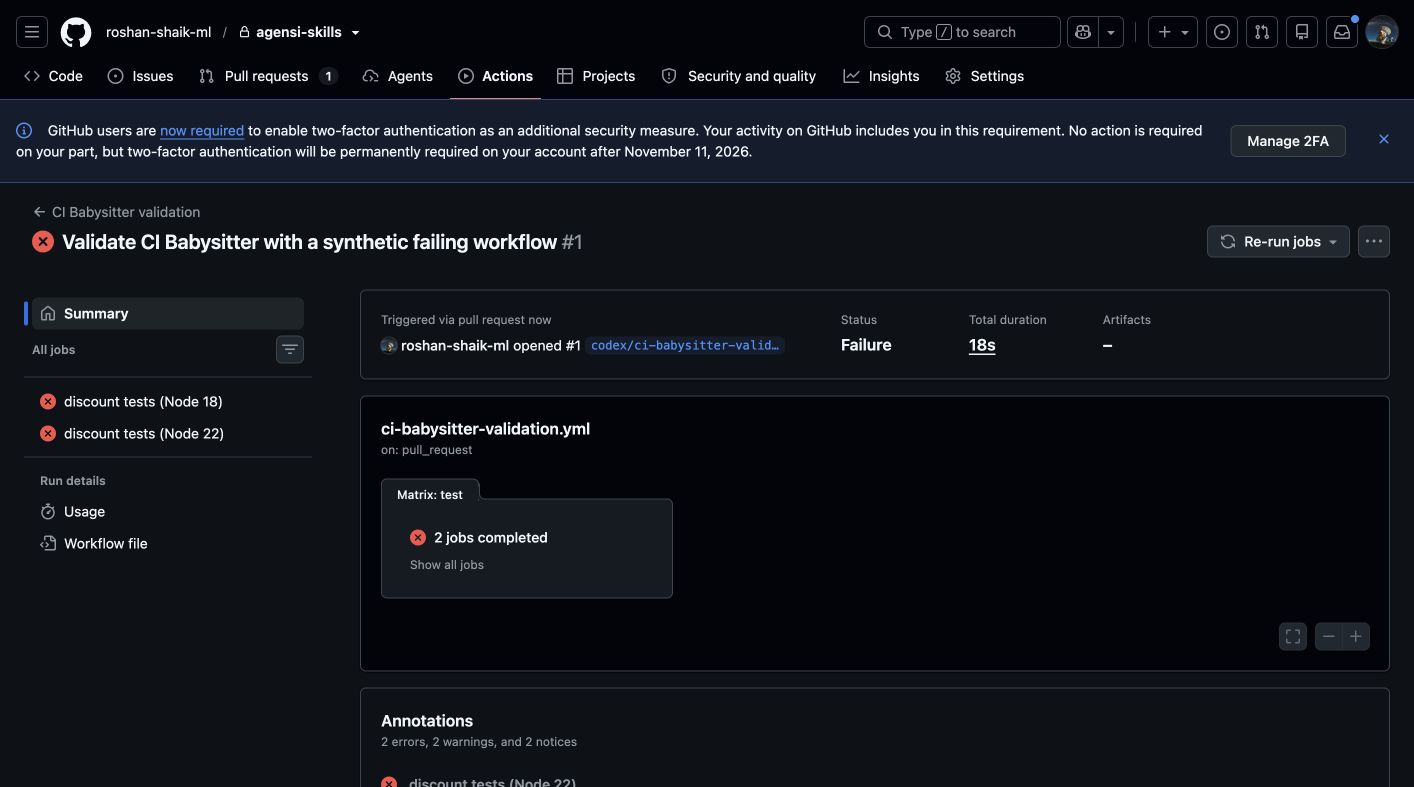
Before
Both Node 18 and Node 22 jobs failed. Two assertions expected 90 but received 100. The local command reproduced the same failure: five tests passed and two failed.
Fix
The function compared the discount code exactly. The agent added a string check, removed surrounding whitespace, and converted the code to uppercase before comparison. Only validation/ci-babysitter/cart.mjs changed. Tests and the workflow stayed unchanged.
Baseline commit: f6b8f6e
Fix commit: 1ab5403
Failed GitHub run: 38019260674
Passed GitHub run: 38019416124
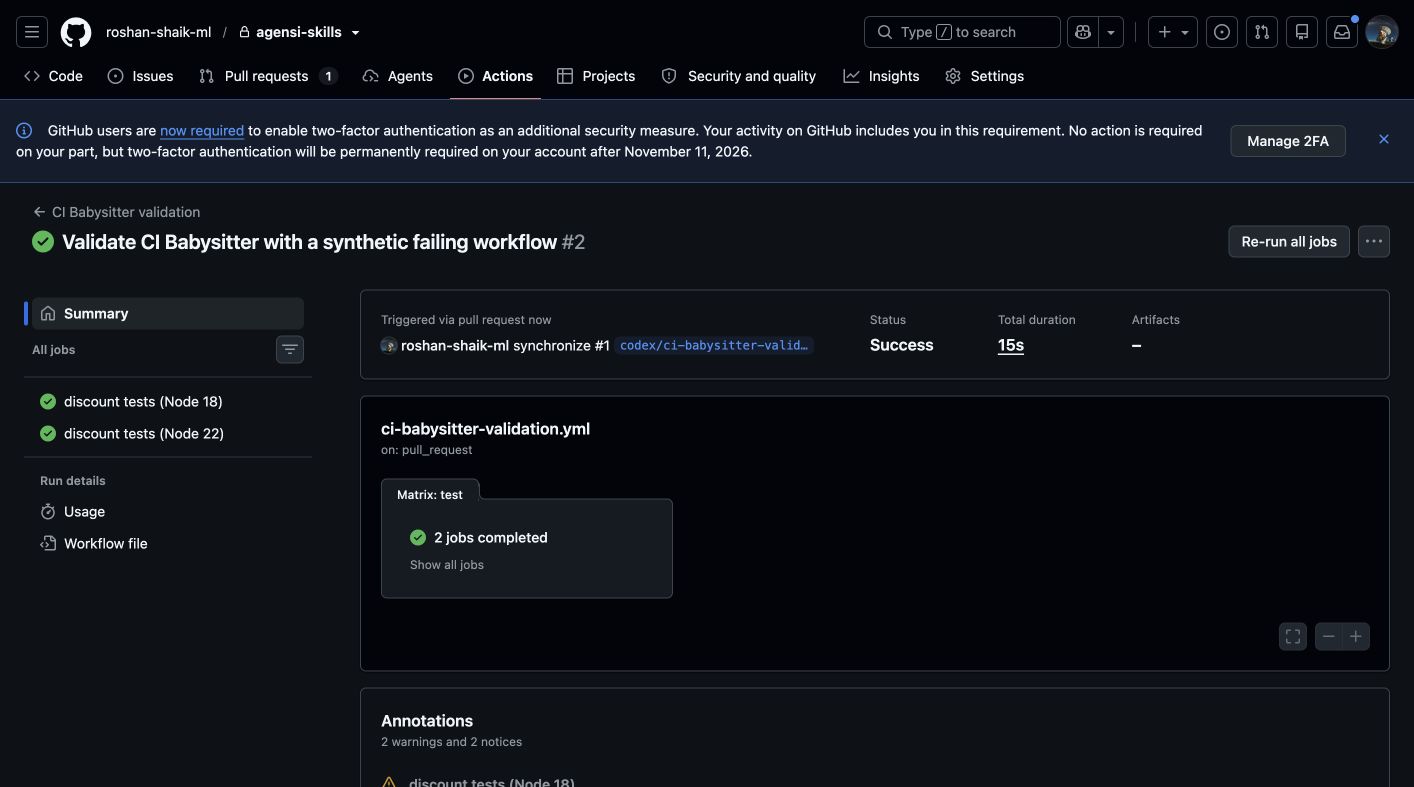
After
The command node --test validation/ci-babysitter/cart.test.mjs passed all seven tests with zero skips. A normal branch push triggered a fresh CI run. Both Node jobs passed.
Re-runs: none
Possibly flaky: none
Not fixed: none in this fixture
Next step: Review the code before a merge. The evaluation PR remains a draft.
No required checks were reported. These results cover both existing checks, not branch-protection requirements. This is one synthetic GitHub case, not a general reliability benchmark. GitLab was not tested.
Before and after evidence
Before: both jobs failed
After: both jobs passed
Connects securely to your tools. The creator never sees your data.
About this skill
Fix a red pull request
CI Babysitter gives your coding agent a repeatable process to diagnose failed checks and verify a code fix. Give it a GitHub PR or GitLab MR.
What you get
One SKILL.md with CLI commands, failure categories, stop rules, and a report template. This version contains no helper scripts.
The workflow
- Check CLI authentication and the PR branch.
- Watch checks and read the failed logs.
- Reproduce the failure with the project command.
- Make a small fix, run local tests, and push to the PR branch.
- Check the new CI run and report the result.
The default limit is three fix rounds. The agent stops for missing secrets, access problems, or a product decision. The instructions prohibit skipped tests, hidden errors, credential disclosure, and unauthorized force pushes. These rules depend on the agent; they are not software enforcement.
Verified example
In our synthetic GitHub test, an independent agent corrected one source line. Both Node 18 and Node 22 jobs then passed. All seven local tests passed. The tests and workflow stayed unchanged. See the demo and before-and-after screenshots.
Setup and limits
Use an agent with terminal and file access, Git, an authenticated gh or glab CLI, and the project tools. Installation does not start a background service. GitLab and other failure types were not tested in this evaluation. Review each code change before a merge.
Instruction-only skill; no standalone background monitor or bundled helper scripts. Requires authenticated gh or glab, Git, project tools, and branch push rights. Default limit: three fix rounds. Cannot fix missing secrets, access rights, billing, or runner outages. Safety instructions depend on the coding agent. One synthetic GitHub case passed; GitLab, flaky retries, and other failure types remain untested. Review code before a merge.
How to use
- 1
Connect your agent to the Agensi MCP
Copy the prompt and paste it into Claude, ChatGPT, Cursor or any agent that supports MCP. It sets up the connection for you. Manual setup
- 2
Sign in to Agensi
Your agent shows a sign-in link. Sign in and click Allow.
- 3
Ask for what you need
Your agent loads this skill and uses it on your task. It always asks before any payment.
Reviews
No reviews yet
Be one of the first to try it. Every listed skill goes through the trust checks below.
Security scanned
Checked by our 8-point scan before listing
Fresh listing
Recently published to Agensi
Money-back guarantee
Doesn't do what its page promises? You get your money back.
Trust & safety
Security scan
Security scan passed 1 month ago
Requires
 GitHub
 Gitlab
Permissions
Allowed Hosts
File Scopes
Runs git, gh or glab, and project test commands in the selected repository. Reads source, tests, workflow files, and CI logs. Writes only files needed for the requested fix. Normal pushes target the PR branch. GitHub or GitLab access uses your existing CLI session. Do not supply credentials to the creator. No credential retrieval or unrelated network calls are requested.