More screenshots
Works with the AI Agents you already use
 Claude Code
 Cursor
 Codex CLI
 Muse
 Dots+21 moreClaude CodeCursorCodex CLIMuseDots
 Manus
 Grok
 Grok Bot+18 agents
Architecture Diagrams
Ask your coding agent for an architecture diagram and get one you'd actually put in a README.
Free

Architecture Diagrams
Example session with this skill installed
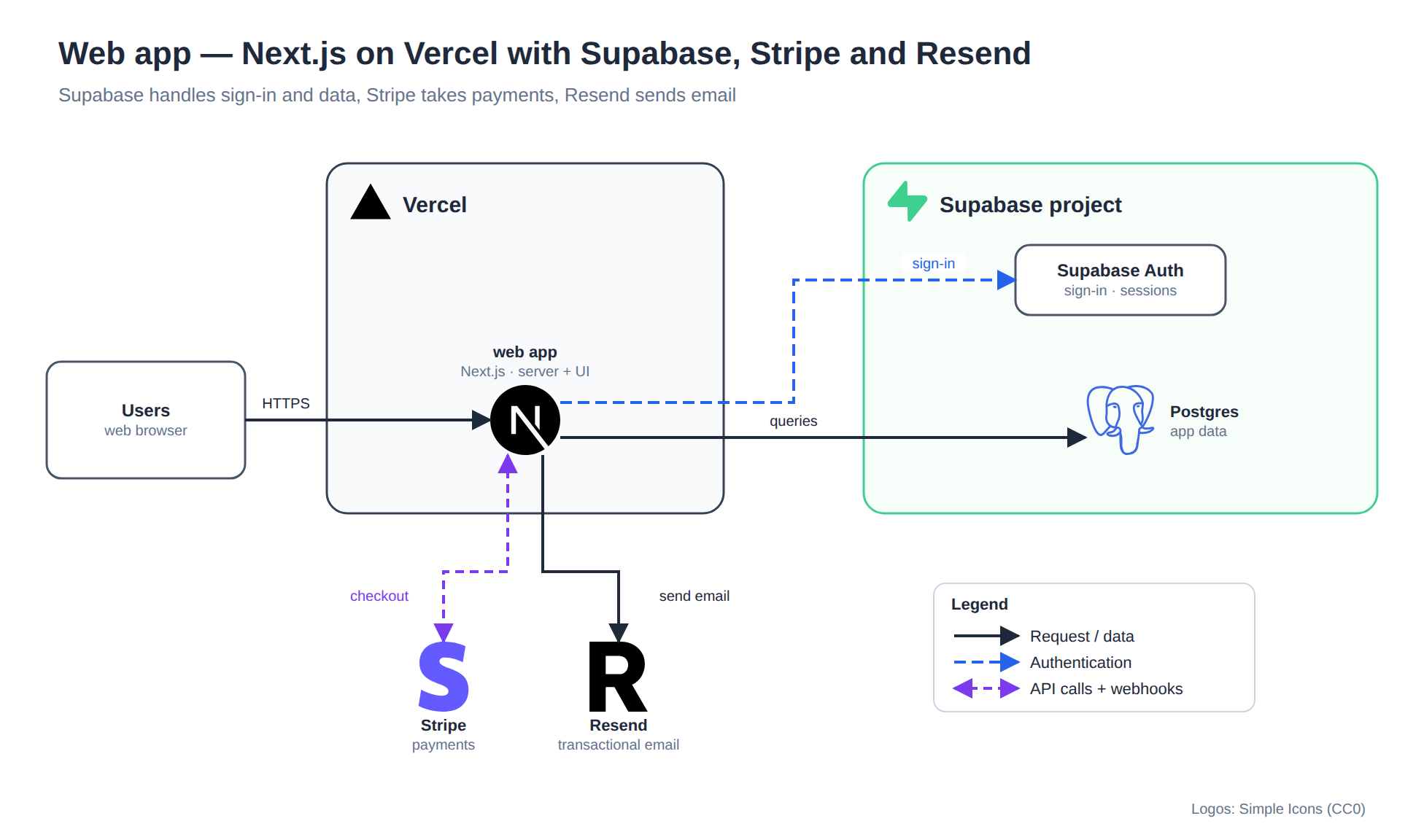
Draw my app's architecture for the README: Next.js on Vercel, Supabase for auth and the database, Stripe for payments, Resend for emails.
- Read your context and instructions
- Compiled the architecture diagrams
Here's your architecture diagram. Users reach the Next.js app on Vercel; the app signs people in with Supabase Auth, stores data in Supabase Postgres, takes payments through Stripe (API calls one way, webhooks back) and sends email with Resend.
What I did
Real logos. Vercel, Next.js, Supabase, Postgres, Stripe and Resend are the official brand marks, looked up from the Simple Icons catalog. Nothing is guessed or redrawn.
Clear layout. The request path runs left to right; Supabase and Vercel are drawn as boundaries; third-party services sit below the app.
Checked. The layout lint found no overlaps, crossing lines or labels on borders, and I reviewed the rendered image before handing it over.
Files
| File | What it is |
|---|---|
docs/architecture/app-architecture.svg | Sharp image for your README (all logos embedded) |
docs/architecture/app-architecture.drawio | Editable diagram; open in draw.io or diagrams.net |
docs/architecture/app-architecture.yaml | Layout spec, so later changes start here |
Add it to your README
## Architecture

Editable source: [app-architecture.drawio](docs/architecture/app-architecture.drawio)
Next steps
- Using Supabase Storage, Edge Functions or a cron job? Tell me and I'll add them.
- Want it to match your repo exactly? Ask me to read the code and I'll pick up the real service names.
Connects securely to your tools. The creator never sees your data.
About this skill
Ask your coding agent for an architecture diagram and get one you'd actually put in a README.
Without this skill, agents guess icon names, stack labels on top of each other and draw arrows everywhere. This skill gives them a method:
- Real icons, never guessed. Every icon is looked up in a catalog: 952 AWS, 363 GCP and 78 Kubernetes icons, draw.io's Azure, IBM and SAP sets, the Microsoft Fabric pack and 3,000+ brand logos. A missing icon fails loudly instead of becoming a blank box.
- Asks about missing logos. If a product or internal app has no icon, it asks once: look up the official logo, use a file you provide, or draw a labelled box. Downloaded logos are cleaned of scripts before use.
- A planned layout. One clear main flow, control above, operations below, nested boundaries, on an 8 px grid.
- Automatic checks. Overlaps, lines through captions, labels on borders, crossing lines and text that doesn't fit are caught before you see the diagram.
- The agent looks at it. It renders a PNG and reviews it before handing the diagram over.
You get an editable .drawio file plus an SVG or PNG. The layout spec is kept next to them, so later changes are quick.
Example prompts
- "Draw the architecture of this repo for the README, with real Azure icons."
- "Read the Terraform in infra/ and draw what it deploys."
- "Make a reference architecture: API Gateway → Lambda → DynamoDB, with EventBridge fan-out to SQS and Step Functions."
Free and open source: https://github.com/manaf-dev/architect-diagrams
Needs Python 3.10+ and Chrome, Edge or Chromium to render previews.
Needs internet the first time each icon is used.
AWS and Kubernetes icons are native draw.io shapes: they show in the .drawio file and the PNG, but the standalone SVG shows labelled placeholders for them. Use the PNG for those diagrams.
Rendering those icons to PNG uses draw.io's online viewer unless draw.io Desktop is installed.
Layout is planned by the agent on a grid, not auto-laid out; very large systems are best split into several diagrams.
How to use
- 1
Connect your agent to the Agensi MCP
Copy the prompt and paste it into Claude, ChatGPT, Cursor or any agent that supports MCP. It sets up the connection for you. Manual setup
- 2
Sign in to Agensi
Your agent shows a sign-in link. Sign in and click Allow.
- 3
Ask for what you need
Your agent loads this skill and uses it on your task. It always asks before any payment.
Reviews
No reviews yet
Be one of the first to try it. Every listed skill goes through the trust checks below.
Security scanned
Checked by our 8-point scan before listing
Fresh listing
Recently published to Agensi
Free forever
No account required to browse
Trust & safety
Security scan
Security scan passed 2 days ago
- Free with an Agensi account
Requires
 GitHub
 Jsdelivr
 Diagrams
 Python
Permissions
Allowed Hosts
File Scopes
Runs Python scripts that build the diagram and write the spec, .drawio and image files (default docs/architecture/, or wherever you choose). Downloads icons from draw.io's GitHub, jsDelivr (Simple Icons) and the Fabric icon pack, cached in ~/.cache/archdiagram. Launches headless Chrome/Edge to render PNGs. Reads CHROME_PATH/DRAWIO_PATH only if set. No accounts, API keys or credentials needed. Every host and its purpose is listed in the "Network access and local programs" section of SKILL.md.