More screenshots
Works with the AI Agents you already use
 Claude Code
 Cursor
 Codex CLI
 Muse
 Dots+21 moreClaude CodeCursorCodex CLIMuseDots
 Manus
 Grok
 Grok Bot+18 agents
AI Photo Director: Image Prompt Builder Skillset
Skip the prompting courses. Get director-level AI image prompts today.
$19

AI Photo Director: Image Prompt Builder Skillset
Example session with this skill installed
$content-imagen-prompt with the attached image reference
- Read your context and instructions
- Compiled the ai photo director
- Generated the image
Create a photorealistic vertical 9:16 bathroom mirror selfie of the adult woman from <<<image_1>>>, wearing a chocolate-brown polka-dot mini dress and carrying a small shoulder bag. Frame from the bathroom wall space above her hair to below the dress hem, with the upper thighs visible and both hands inside the image. Her pale-lit shoulder and arm contrast with the darker dress and bathroom recesses. Preserve the phone covering most of her face, wired earphones and relaxed gesture gathering the skirt.
Use <<<image_1>>> as the sole authority for identity and physique. Preserve her recognizable head shape, underlying skin pigmentation and the shoulder, chest, waist, hip and limb proportions established by the character reference. Retain her short dark-brown bob, soft fringe and slightly outward-turning ends. The short hair is lightly damp, with naturally separated strand groups beside the ears and nape. Preserve her facial geometry wherever the cheek and jaw remain visible beside the phone. Her face is bare, lips retain their natural color, and ears, neck, wrists and fingers are free of jewelry. No added makeup, earrings, necklaces, pendants, bracelets or rings.
All image-left and image-right directions describe the reflected view. She stands mostly facing the mirror, weight settled into one hip with a gentle shoulder counter-tilt. The arm at image-right bends upward, holding a dark smartphone vertically in front of the central face. Its back faces the mirror, showing a rear camera cluster and a pale flower graphic on the case. Her fingers curl naturally around its edges and the thumb stabilizes the grip. Her other arm hangs at image-left, with the hand gently gathering a small fold of dress fabric at the outer upper thigh. This creates a slight diagonal lift in the hem. Keep the hand contact clear and the standing proportions natural.
Give her a relaxed, quietly self-assured mood through a small head tilt, lowered shoulders and comfortable hip shift. Her gaze follows the phone display, while the central face stays naturally obscured. White wired earphones sit in her ears. Their thin cables descend beside the neck, cross loosely over the chest and form soft overlapping loops over the front of the dress before returning toward the phone. Keep the cable routing physically continuous and separate from the straps and fingers.
She wears an opaque chocolate-brown slip-style mini dress with small ivory polka dots, thin spaghetti straps and a softly gathered V neckline. The fabric follows her own chest and waist, with shallow horizontal gathers around the abdomen and hips. Its short skirt falls over the upper thighs, gathering gently where her lowered hand holds the side. The dots follow the fabric folds and change spacing naturally under tension. A small tan-and-brown patterned shoulder bag hangs beneath the raised arm at image-right. A dark strap rests on that shoulder beside the dress strap, and the softly structured bag presses lightly against her side at rib-to-waist height.
The bathroom has muted gray-green vertically ribbed wall tiles at image-left. Black-framed fluted-glass shower panels rise behind her on both sides of a broad pale wall section, with dark hinges visible high in the frame. A square black wall plate appears near the bag at image-right. A pale pump bottle with a black dispenser sits on a narrow background ledge at image-left. The mirror's thin dark border and softly rounded lower corners are partly visible. Keep the layout sparse and geometrically coherent.
Use directional natural light entering from off-frame reflected image-left. It creates warm highlights on the visible cheek edge, shoulder, collarbone, lowered arm and exposed thigh, with pronounced falloff across the opposite side of the body. Preserve deeper shade beneath the chin, raised forearm, neckline gathers, bag and skirt folds. Weak room bounce reveals limited detail in the shaded torso and bathroom recesses. The brown dress stays rich and dark, with small pale dots and restrained soft highlights. Fluted glass carries narrow diffuse reflections, black frames stay deep in tone and the pale wall is brighter than the shaded panels. Skin retains natural tonal variation and localized sheen, with subtle detail appropriate to the viewing distance.
Foreground — The reflected phone and raised hand overlap the face, while thin white earphone cables loop across the chest and dress. The mirror border enters near the lower corners.
Midground — Her short dark bob, polka-dot dress, relaxed lowered hand and patterned shoulder bag form the main portrait.
Background — Ribbed tiles, black-framed fluted glass, dark hinges, pale wall section, square black plate and small pump bottle establish the bathroom.
Shot on the smartphone rear main camera aimed into a single mirror, with an approximately 28mm full-frame-equivalent lens. Hold the phone vertically at face height with a slight downward angle to include the upper thighs. Keep the viewpoint tied to the reflected rear camera and preserve natural body proportions. Focus on the reflected head and upper torso, retaining coherent hands, earphone cables and fabric folds. Expose for the illuminated skin and pale wall, allowing the dress, opposite body side and glass-panel recesses to remain substantially darker. Use restrained warm-neutral color, moderate local contrast and gentle detail falloff.
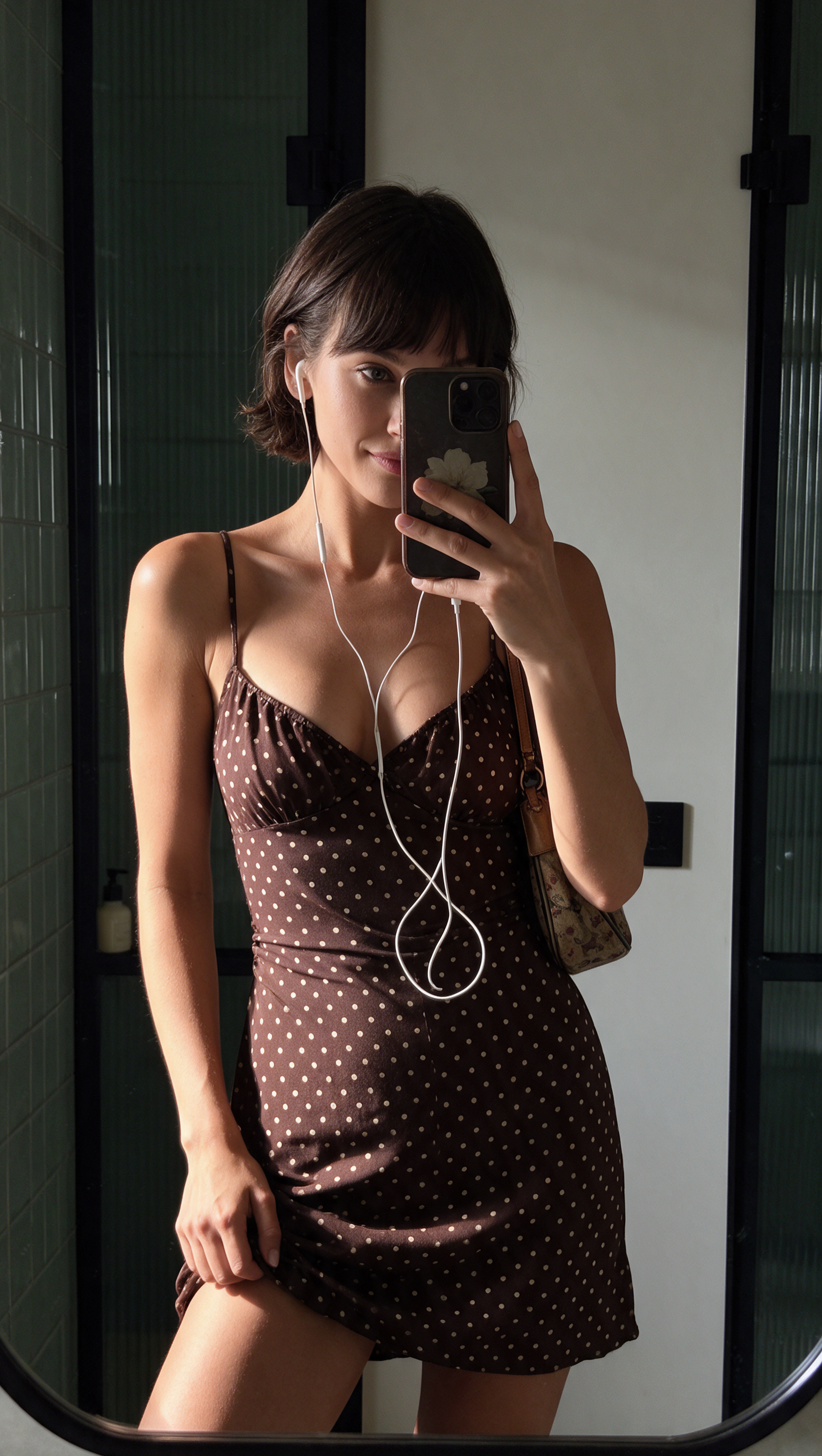
1794243817206-577p.png
PNG · 1536×1024
Example file from a real run - the skill writes it into your workspace.
Connects securely to your tools. The creator never sees your data.
About this skill
AI image courses cost $9 to $100 each, plus hours of lessons and failed generations. Skip all that: install this skillset once and the know-how lives inside your AI assistant.
What you can do
- Write text or JSON prompts from an idea.
- Recreate a photo's camera, light and pose with your own character.
- Check a prompt before you spend credits.
- Review an image and find what went wrong.
- Fix a prompt from your feedback.
- Generate an image, if a generator is connected.
One command runs the pipeline
Type /content-imagen ($content-imagen in Codex, @content-imagen in ChatGPT; in the Claude app, ask by name) and say what you want, in any language. It picks the steps you need and does the work of a director, cinematographer, gaffer and stylist. You get a ready-to-paste English prompt.
What's inside
- 6 stages: brief, prompt, check, generate, review, refine.
- 9 photographic phrase banks.
- 35 ready lighting setups.
- 5 worked examples with prompt, image and review.
- PDF install guide.
Requires external image generation tool. Automated validation scripts require a Python or JavaScript execution environment. Focuses on structured workflows over creative brainstorming.
How to use
- 1
Connect your agent to the Agensi MCP
Copy the prompt and paste it into Claude, ChatGPT, Cursor or any agent that supports MCP. It sets up the connection for you. Manual setup
- 2
Sign in to Agensi
Your agent shows a sign-in link. Sign in and click Allow.
- 3
Ask for what you need
Your agent loads this skill and uses it on your task. It always asks before any payment.
Reviews
No reviews yet
Be one of the first to try it. Every listed skill goes through the trust checks below.
Security scanned
Checked by our 8-point scan before listing
Fresh listing
Recently published to Agensi
Money-back guarantee
Doesn't do what its page promises? You get your money back.
Trust & safety
Security scan
Security scan passed 7 days ago